

Search interest around AI and DevOps has changed. A year ago, many people were asking whether AI would replace DevOps engineers. In 2026, the better questions are practical: how do we use AI safely in CI/CD, where does AIOps actually help, what should beginners learn first, and how do teams stop AI-generated automation from creating production risk?
The short version: AI is becoming useful in DevOps when it is placed inside controlled workflows. It can draft pipelines, summarize incidents, detect noisy patterns in logs, create runbook suggestions, help with Kubernetes troubleshooting, and speed up security reviews. It becomes dangerous when teams let it generate infrastructure, deployment logic, or remediation steps without review, tests, policy checks, and ownership.
Quick Answer
AI in DevOps is the use of machine learning, generative AI, and agentic tools to improve software delivery and operations. The highest-value use cases in 2026 are CI/CD assistance, log and incident analysis, DevSecOps checks, infrastructure-as-code review, runbook automation, Kubernetes troubleshooting, and platform engineering self-service. Start with low-risk workflows where AI suggests changes but humans approve them. Move toward automated remediation only after you have strong observability, tests, rollback paths, and policy-as-code.
If you are new, learn the DevOps fundamentals first: Linux, Git, CI/CD, Docker, Kubernetes basics, Terraform or OpenTofu, monitoring, and cloud networking. Then add AI skills: prompt design for operations, reading model output critically, retrieval-augmented runbooks, AI code review, and governance for generated changes.
What People Are Searching About AI and DevOps
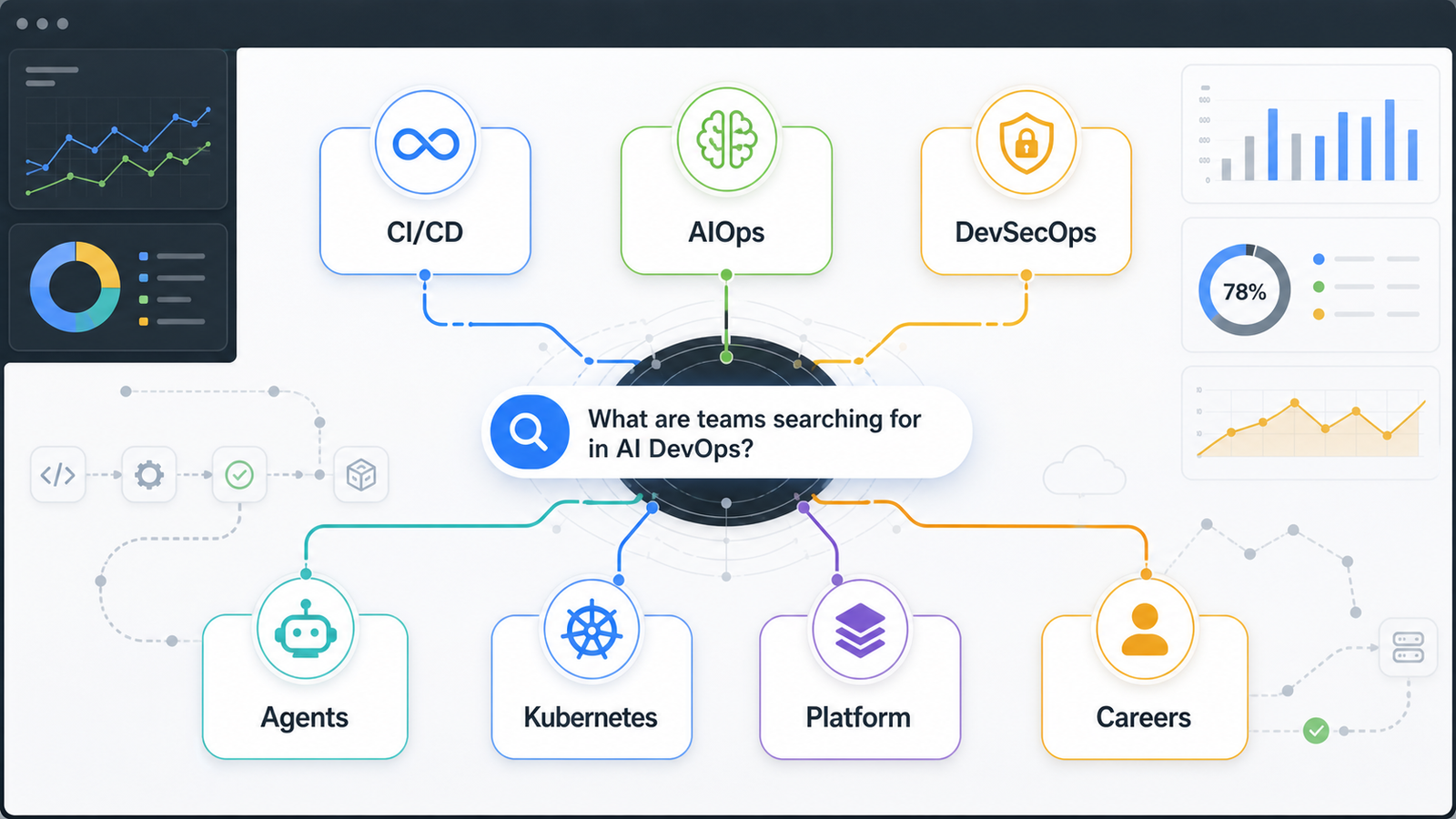
Based on current Google search results, industry reports, and recent vendor documentation, the questions cluster into seven topics:
| Search topic | What people really want to know | Practical answer |
|---|---|---|
| AI in CI/CD | Can AI build or fix pipelines? | Yes, but generated workflows need validation, secrets checks, and branch protection. |
| AIOps | Can AI reduce alert noise and find root causes? | It helps when telemetry is clean and incidents are tagged consistently. |
| AI DevSecOps | Can AI secure code and pipelines? | It can triage findings and spot patterns, but policy gates still matter. |
| AI agents for DevOps | Can agents handle tickets or repo tasks? | They can handle scoped tasks through pull requests and review workflows. |
| Kubernetes troubleshooting | Can AI debug clusters? | It can explain events and logs, but must not run unsafe commands blindly. |
| Platform engineering | How does AI fit into internal developer platforms? | Use it to improve self-service, templates, documentation, and workflow guidance. |
| DevOps careers | Will AI replace DevOps engineers? | It changes the job toward review, reliability, security, and platform design. |
This lines up with where major platforms are moving. GitHub has pushed coding agents and agentic workflows into repository tasks. Microsoft describes agentic DevOps as AI across the software lifecycle. GitLab's 2026 DevSecOps material focuses on AI, governance, traceability, and toolchain sprawl. The market is not only buying chatbots; it is wiring AI into delivery systems.
Is AI Replacing DevOps Engineers?
No, but it is removing some low-value manual work. The engineer who only writes YAML from memory is exposed. The engineer who understands release safety, cloud cost, security, debugging, rollback design, and developer experience becomes more important.
AI can draft a GitHub Actions workflow. It cannot know whether your production deployment requires a change window, whether a compliance exception is still valid, or whether a cost spike is acceptable for a launch week. Those decisions need context.
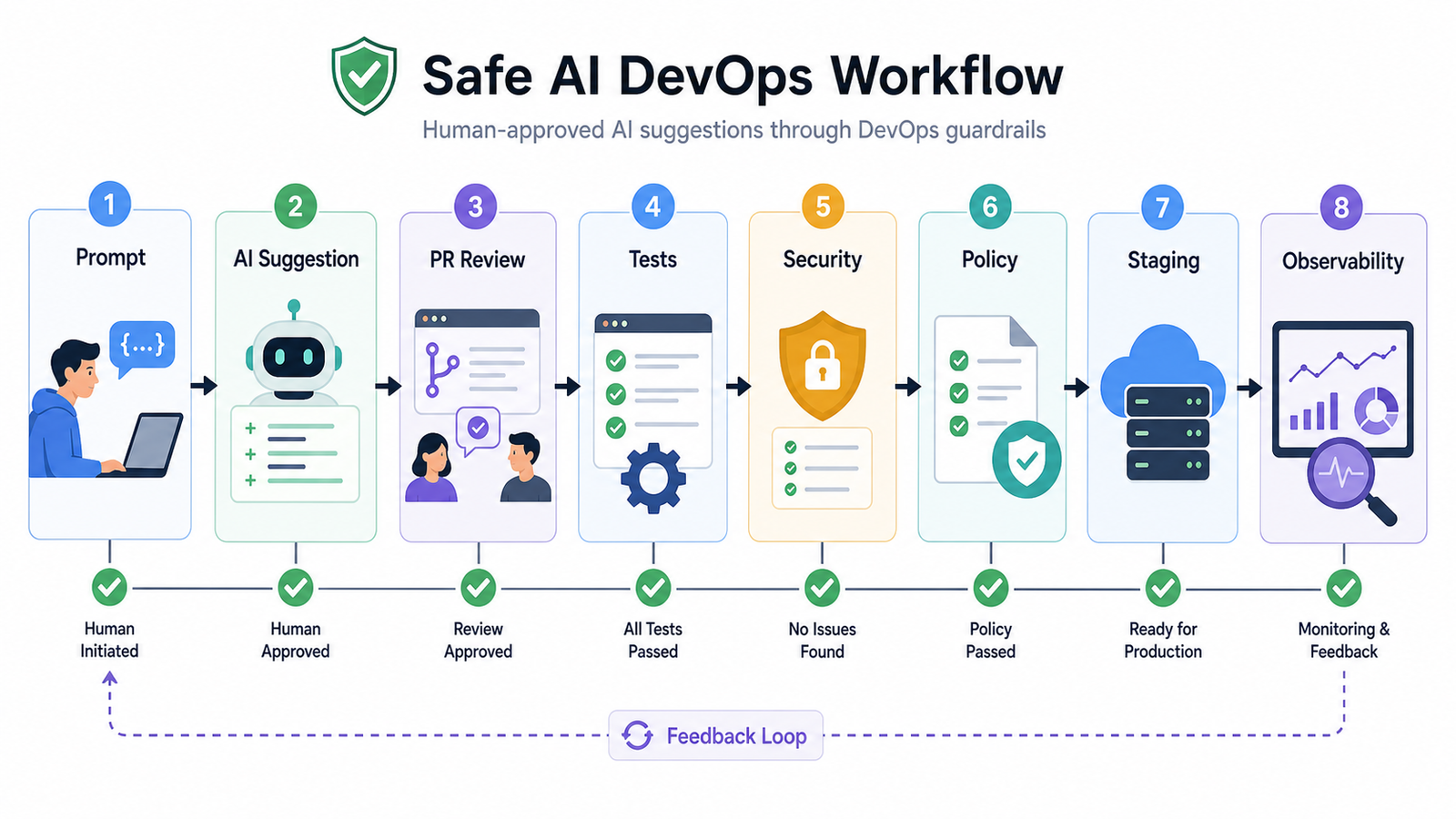
The new DevOps skill is knowing where AI output fits in the system:
- Generated code goes through pull requests.
- Generated infrastructure plans go through policy checks.
- Generated incident summaries are verified against metrics and logs.
- Generated remediation steps are tested in staging or run in read-only mode first.
- Generated documentation is kept close to the platform templates it describes.
Beginner Path: How to Learn AI DevOps Without Getting Lost
If you are starting from scratch, build the foundation in this order:
- Learn Linux commands, process basics, networking basics, and shell scripting.
- Learn Git, pull requests, branch protection, and code review habits.
- Build a simple CI pipeline that runs tests on every pull request.
- Containerize a small app with Docker.
- Deploy it to Kubernetes or a managed container service.
- Add monitoring with Prometheus, Grafana, OpenTelemetry, or a managed observability tool.
- Add infrastructure as code with Terraform, OpenTofu, Pulumi, or cloud-native templates.
- Use AI to explain logs, generate pipeline drafts, improve runbooks, and review configuration.
A good beginner project is simple: create a small API, add tests, build a container image, scan it, deploy it to a test namespace, and ask an AI assistant to suggest improvements. Compare the suggestion with the actual pipeline logs and security scanner output.
Example prompt:
You are reviewing a GitHub Actions workflow for a Node.js API.
Find reliability, security, and caching issues.
Do not rewrite the whole file.
Return only high-confidence comments with the exact line or step name.
That prompt works because it limits scope, sets review criteria, and asks for actionable output.
Practitioner Path: Where AI Actually Helps in DevOps
For working engineers, the best AI DevOps use cases are repetitive tasks that already have evidence in logs, code, tickets, and metrics.
1. CI/CD Pipeline Review
AI is useful for finding missing caches, unsafe secret handling, repeated shell logic, unpinned actions, absent timeouts, and poor artifact naming. For generated pipelines, add a validation checklist:
| Check | Why it matters |
|---|---|
| Secrets are never printed | Prevents credential exposure in logs. |
| Third-party actions are pinned | Reduces supply-chain risk. |
| Tests fail closed | Stops broken builds from deploying. |
| Deployment has rollback | Keeps release risk manageable. |
| Scan results are visible | Makes security review part of delivery. |
2. Incident Summaries
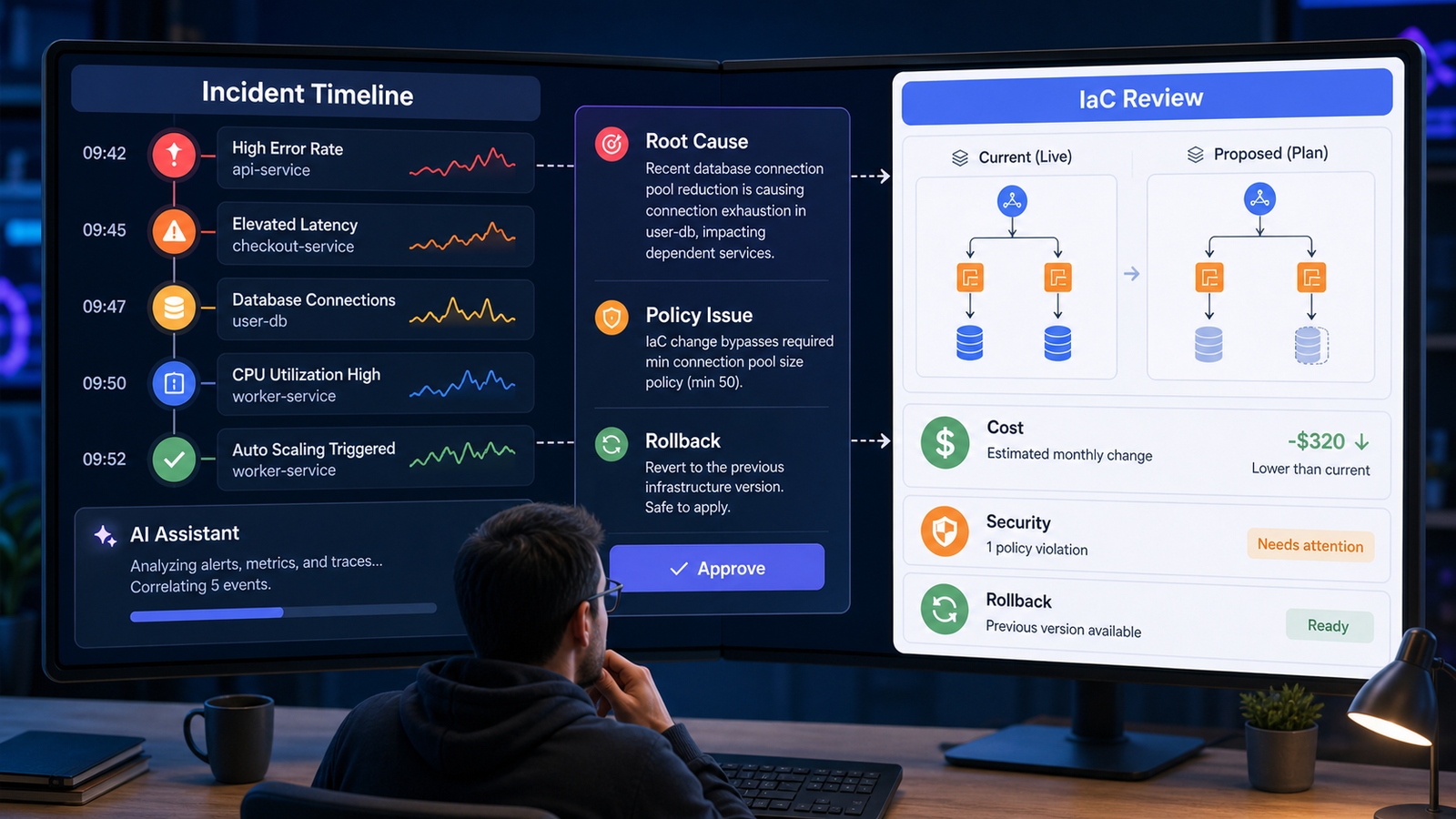
During an incident, AI can summarize timelines, group related alerts, convert logs into hypotheses, and draft customer-facing updates. Keep it away from final decisions until your process is mature. A useful pattern is:
Summarize these events as an incident timeline.
Separate facts from hypotheses.
List the top three possible causes and what evidence would confirm each one.
Do not recommend remediation unless the evidence supports it.
3. AIOps for Alert Noise
AIOps works best when your observability data is consistent. If half your services have no ownership tags, traces are missing, dashboards disagree, and incidents are not labeled, AI has little reliable context. Standardize service names, severity levels, deployment markers, and runbook links first.
Then use AI for:
- grouping duplicate alerts,
- detecting unusual metric combinations,
- linking deploys to error spikes,
- suggesting probable owners,
- summarizing historical incidents.
4. DevSecOps and Supply Chain Review
AI can make security findings easier to understand. It can explain why a dependency issue matters, identify whether a vulnerable package is reachable, and draft a fix plan. But gates should still be deterministic: SAST, SCA, container scanning, SBOM creation, signing, provenance, and policy-as-code.
The practical approach is “AI explains, policy enforces.”
5. Infrastructure as Code Review
AI-generated IaC often looks correct while hiding expensive defaults, open security groups, missing encryption, broad IAM roles, or weak lifecycle settings. Use AI as a reviewer, not as the only author.
Ask it:
Review this Terraform plan for cost, security, reliability, and drift risk.
Call out any public exposure, broad IAM permissions, missing tags, and resources that may be expensive by default.
Then verify with tools such as Checkov, tfsec, Open Policy Agent, or your cloud provider's policy service.
Which AI DevOps Tool Should You Choose?
There is no universal winner. Choose based on where your team works today.
| Need | Tool category to consider | Selection criteria |
|---|---|---|
| Code and pipeline assistance | IDE or repository AI assistants | PR workflow, audit trail, enterprise controls, supported languages |
| Incident analysis | Observability and AIOps platforms | Telemetry quality, integrations, explainability, on-call workflow |
| Security triage | DevSecOps platforms and scanners with AI | Policy controls, evidence quality, false positive handling |
| Runbook search | RAG over docs, tickets, and postmortems | Source freshness, access control, citation quality |
| Internal developer platform help | Platform portals with AI assistants | Template governance, service catalog integration, approval flows |
Pricing caveat: AI features are often sold as premium seats, usage-based credits, or add-ons. Check whether agent runs, model requests, indexed repositories, and security features are included.
A Safe 30-Day Action Plan
Use this plan if your team wants results without turning production into an experiment.
Week 1: Pick One Workflow
Choose one workflow with clear inputs and outputs:
- CI pipeline review for one repository,
- incident summary drafts,
- runbook search for one service,
- Terraform pull request review,
- security finding explanations.
Week 2: Build Guardrails
Define what AI may read, suggest, and change. For most teams, the first version should be read-only plus pull request comments. Add branch protection, required reviews, scanner gates, and audit logging.
Week 3: Measure Usefulness
Track practical metrics:
- time saved per review,
- number of useful comments,
- false positive rate,
- incidents summarized correctly,
- rollback or security issues caught before production,
- engineer satisfaction after real use.
Week 4: Expand Carefully
If the first workflow works, expand to a neighboring workflow. For example, move from pipeline review to generated test suggestions, or from incident summaries to postmortem drafts. Keep human approval for production changes.
Common Mistakes
The most common mistake is using AI to hide weak DevOps foundations. If deployments are manual, tests are flaky, secrets are scattered, and logs are inconsistent, AI will produce confident noise.
Another mistake is treating AI output as ownership transfer. If an AI agent opens a pull request, a human team still owns the result. A third mistake is ignoring cost from premium seats, long-running agents, extra CI minutes, and cloud resources created from generated templates.
Internal Links for Next Reading
If you are building an AI DevOps learning path, start with the GravityDevOps beginner guide to generative AI: https://gravitydevops.com/what-is-generative-ai-beginners-guide/
If you are evaluating delivery platforms, compare CI/CD options here: https://gravitydevops.com/best-cicd-tools-2026-compared/
Useful related cluster targets include AI DevOps workflow, AIOps vs DevOps automation, AI DevSecOps pipeline security, AI DevOps skills matrix, and AI DevOps tools selection.
FAQ
What is AI in DevOps?
AI in DevOps means using AI systems to assist software delivery and operations work, including pipeline generation, code review, incident analysis, infrastructure review, security triage, observability, and runbook automation.
What is the difference between AIOps and DevOps?
DevOps is a culture and engineering practice for delivering software reliably. AIOps is a set of AI-driven techniques for IT operations, especially alert correlation, anomaly detection, root cause analysis, and incident response support.
Can AI create CI/CD pipelines?
Yes. AI can draft CI/CD pipelines from natural language and repository context, but teams should validate generated workflows with tests, security scans, branch protection, secret handling checks, and peer review.
Will AI replace DevOps engineers?
AI will replace some repetitive tasks, not the full DevOps role. Engineers still need to design reliable systems, review generated changes, manage security, control cloud cost, handle incidents, and improve developer experience.
What should beginners learn before AI DevOps?
Beginners should learn Linux, Git, CI/CD, Docker, Kubernetes basics, cloud fundamentals, infrastructure as code, monitoring, and security basics before relying heavily on AI tools.
Where should a team start with AI DevOps?
Start with a low-risk read-only workflow, such as incident summaries, pipeline review suggestions, runbook search, or Terraform pull request review. Move to automated changes only after reviews, tests, policy checks, and rollback paths are mature.


