
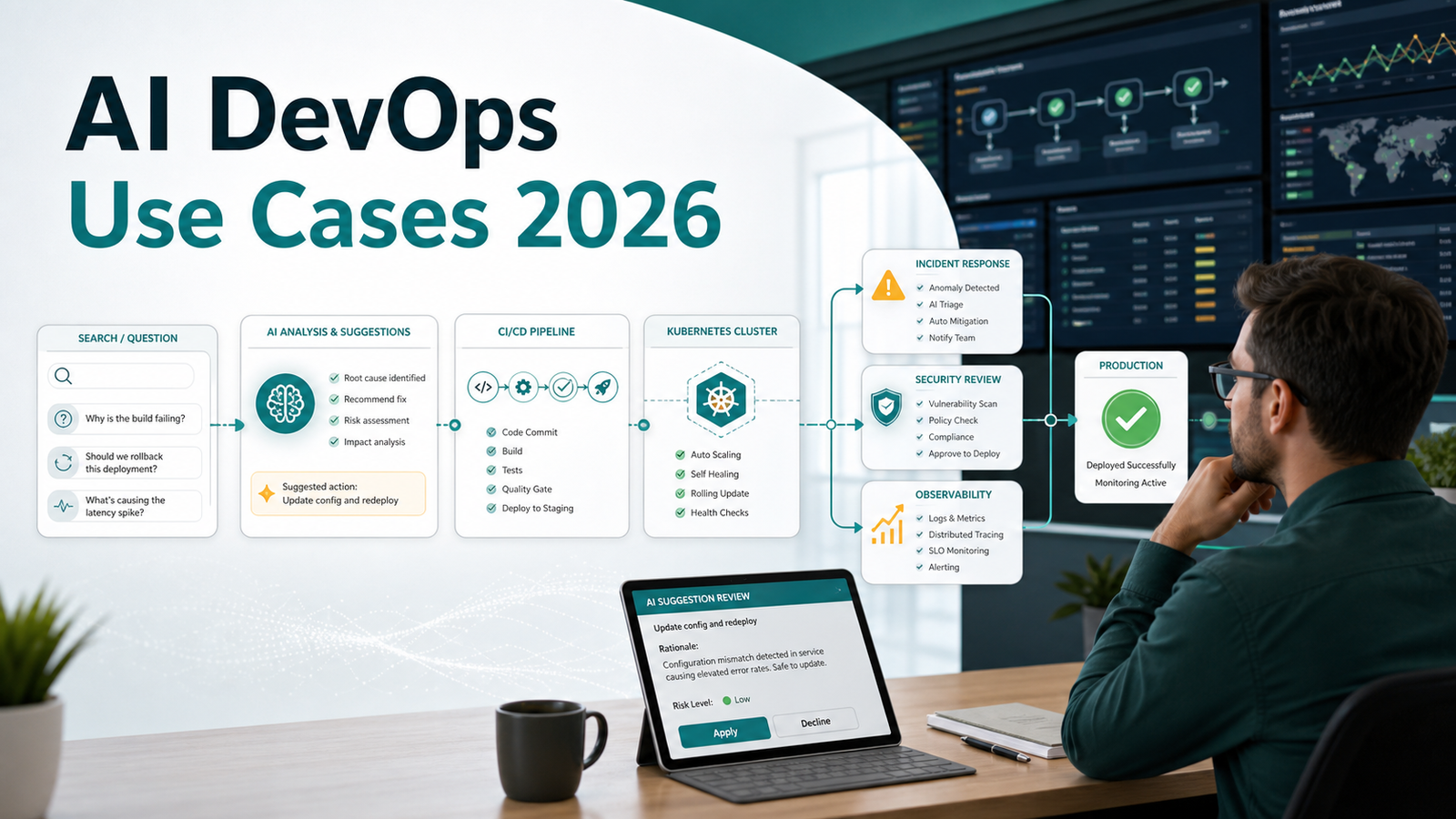

AI DevOps Use Cases 2026: What Teams Should Automate First Based on Search Intent
DevOps teams are no longer asking only “What is AI in DevOps?” The searches have become more direct: “Will AI replace DevOps engineers?”, “How do I use AI in CI/CD?”, “What are the best AI DevOps tools?”, “Can AI fix Kubernetes incidents?”, and “How do I secure AI-generated infrastructure code?”
Those questions show the market has moved past curiosity into implementation. Engineers want to know where AI is safe, where it saves time, and where it creates risk.
Quick Answer
The best AI DevOps use cases to automate first in 2026 are low-risk, reviewable workflows: CI/CD failure summarization, test failure triage, pull request review assistance, infrastructure-as-code linting, Kubernetes troubleshooting suggestions, runbook search, incident timeline generation, and cost anomaly investigation. Avoid giving AI direct production-change authority until your team has strong logs, policy-as-code, approval gates, rollback automation, and audit trails.
In short: use AI first as a reviewer, explainer, and triage assistant. Move toward autonomous remediation only after the team can measure accuracy, blast radius, mean time to recovery, and change failure impact.
What Google Search Demand Says About AI and DevOps
Current Google results around AI and DevOps cluster into five practical intents:
1. Career concern: “Will AI replace DevOps engineers?”
2. Beginner implementation: “How to use AI in DevOps?”
3. Tool comparison: “Best AI tools for DevOps engineers.”
4. Pipeline automation: “AI in CI/CD,” “AI deployment automation,” and “agentic CI/CD.”
5. Reliability and security: “AIOps,” “AI incident response,” “AI DevSecOps,” and “secure AI-generated code.”
This article answers the practical question behind those searches: which tasks should be automated first, and which should stay under human control?
The useful framing comes from the 2025 DORA research on AI-assisted software delivery, which found that AI tends to amplify the organization that adopts it. Strong teams get faster; messy teams often make the mess move faster.
The AI DevOps Automation Ladder
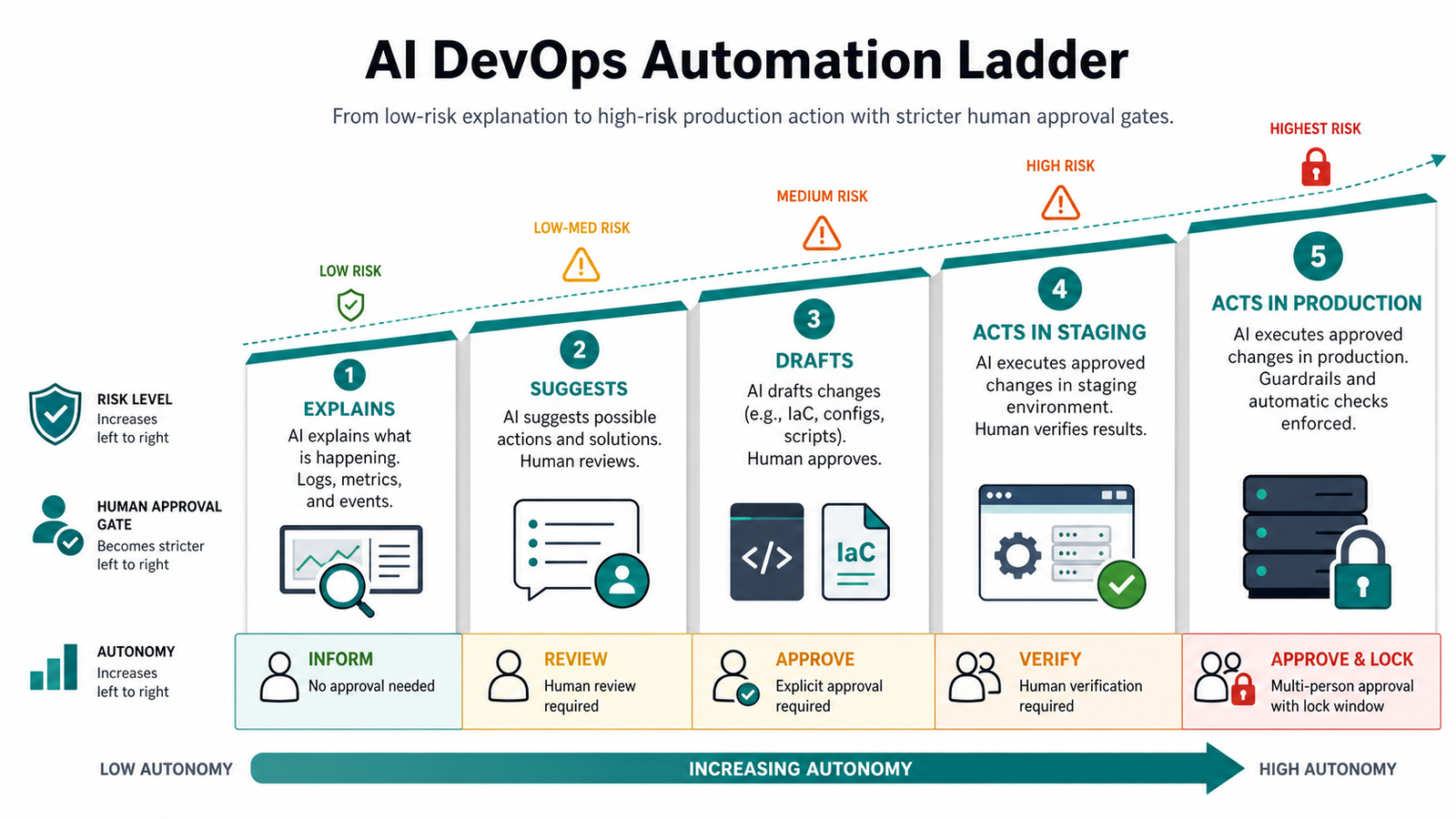
Think of AI DevOps adoption as a ladder, not a switch.
| Level | AI role | Example | Risk | Human approval |
|---|---|---|---|---|
| 1 | Explains | Summarizes a failed GitHub Actions job | Low | Optional |
| 2 | Suggests | Recommends a fix for a flaky test | Low to medium | Required |
| 3 | Drafts | Creates a Terraform module or Kubernetes manifest | Medium | Required |
| 4 | Acts in staging | Restarts a staging deployment or opens a rollback PR | Medium to high | Required |
| 5 | Acts in production | Performs remediation during an incident | High | Strictly gated |
Most teams should spend more time at levels 1 to 3 than vendors imply. The goal is to reduce toil while keeping production responsibility clear.
Use Case 1: CI/CD Failure Summaries
This is the safest place to start because CI logs are noisy, repetitive, and reviewable. The AI should explain why the build failed and point to the probable file, command, or dependency change.
A good CI/CD AI assistant should identify the failed job, error category, whether the failure is new, the smallest local reproduction command, and the logs used as evidence.
Example prompt for a CI assistant:
Summarize this failed CI job for a developer. Separate known facts from guesses.
Return: failing step, error category, likely root cause, local reproduction command, and files to inspect.
Do not suggest merging, skipping tests, or changing production settings.
Beginner step: connect AI to read-only CI logs first. Avoid repository write access until the team trusts the summaries.
Practitioner guardrail: require exact log lines or job URLs. If the AI cannot point to evidence, treat the answer as a hypothesis.
Use Case 2: Pull Request Review for DevOps Changes
AI is useful at reviewing repetitive infrastructure changes: Dockerfiles, Helm values, GitHub Actions workflows, Terraform modules, Kubernetes manifests, and monitoring rules. It can catch missing resource limits, dangerous permissions, unpinned actions, broad IAM policies, plaintext secrets, and common YAML mistakes.
The review should become the first pass that catches obvious issues before a human spends attention on design tradeoffs.
Checklist for AI PR review:
• Does the change widen network, IAM, or secret access?
• Are container image tags pinned?
• Are CPU and memory requests defined?
• Does the workflow use trusted actions?
• Does Terraform plan create or destroy unexpected resources?
• Are rollback steps documented?
• Does the change affect production, staging, or shared infrastructure?
For teams already using CI/CD heavily, connect this section to a deeper comparison such as Best CI/CD Tools 2026 Compared. Tooling matters less than review discipline, but the CI platform determines how cleanly AI can access logs, diffs, policy checks, and deployment history.
Use Case 3: Infrastructure-as-Code Drafting and Policy Checks
AI can draft Terraform, OpenTofu, Pulumi, CloudFormation, or Kubernetes YAML quickly. The common mistake is treating generated infrastructure as finished code instead of a first draft.
Use AI for:
• Generating a starting module from a clear requirement
• Explaining a Terraform plan
• Finding drift between desired and actual state
• Suggesting least-privilege IAM changes
• Converting repeated YAML into reusable templates
• Writing policy-as-code tests
Do not use AI as the final reviewer for:
• IAM permissions
• Public network exposure
• Encryption settings
• Production database changes
• Stateful Kubernetes storage
• Cost-heavy GPU or high-memory resources
Practical example:
Review this Terraform plan as a risk checklist. Group findings by security, cost, availability, and reversibility.
Flag any public exposure, broad IAM permissions, data deletion, region change, or expensive instance type.
Do not rewrite the plan; only identify risks and questions for human review.
This keeps the AI in a reviewer role instead of letting it silently change infrastructure.
Use Case 4: Kubernetes Troubleshooting
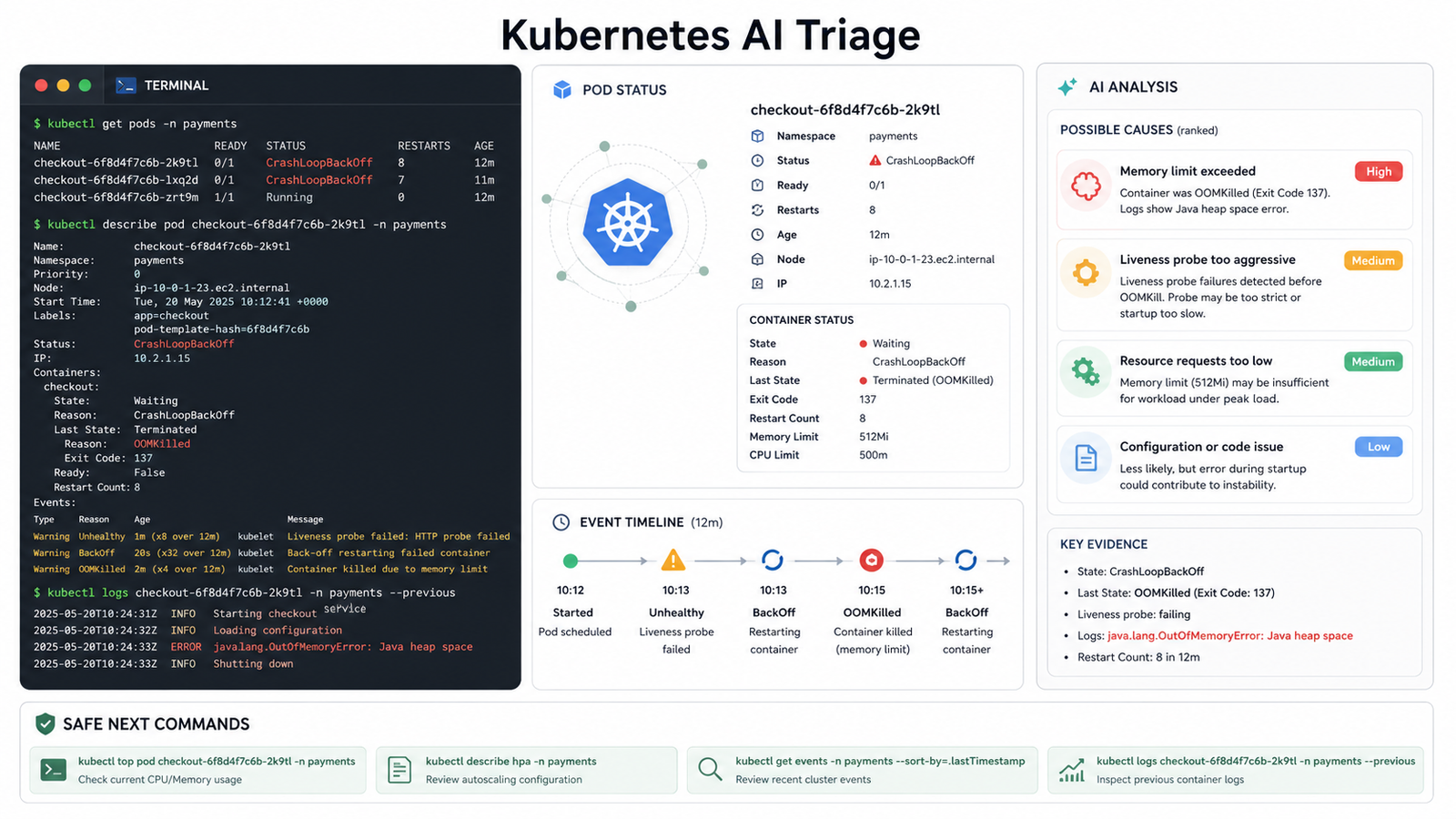
Kubernetes is one of the strongest AI DevOps use cases because the signal is structured: events, pod status, logs, resource limits, probes, deployment history, and node conditions. AI can help beginners understand what “CrashLoopBackOff” means and help practitioners correlate symptoms faster.
Safe first commands:
kubectl get pods -n app
kubectl describe pod <pod-name> -n app
kubectl logs <pod-name> -n app --previous
kubectl get events -n app --sort-by=.lastTimestamp
kubectl top pod -n app
Then ask AI to classify the issue:
Use these Kubernetes outputs to classify the incident.
Return one of: image pull failure, config error, probe failure, OOMKilled, scheduling problem, dependency outage, or unknown.
Include evidence from the outputs and one safe next command.
Common mistake: letting AI jump from “pod is failing” to “increase memory” without checking whether the app is leaking memory, loading a bad config, or failing a dependency check.
Use Case 5: Incident Timeline and Runbook Search
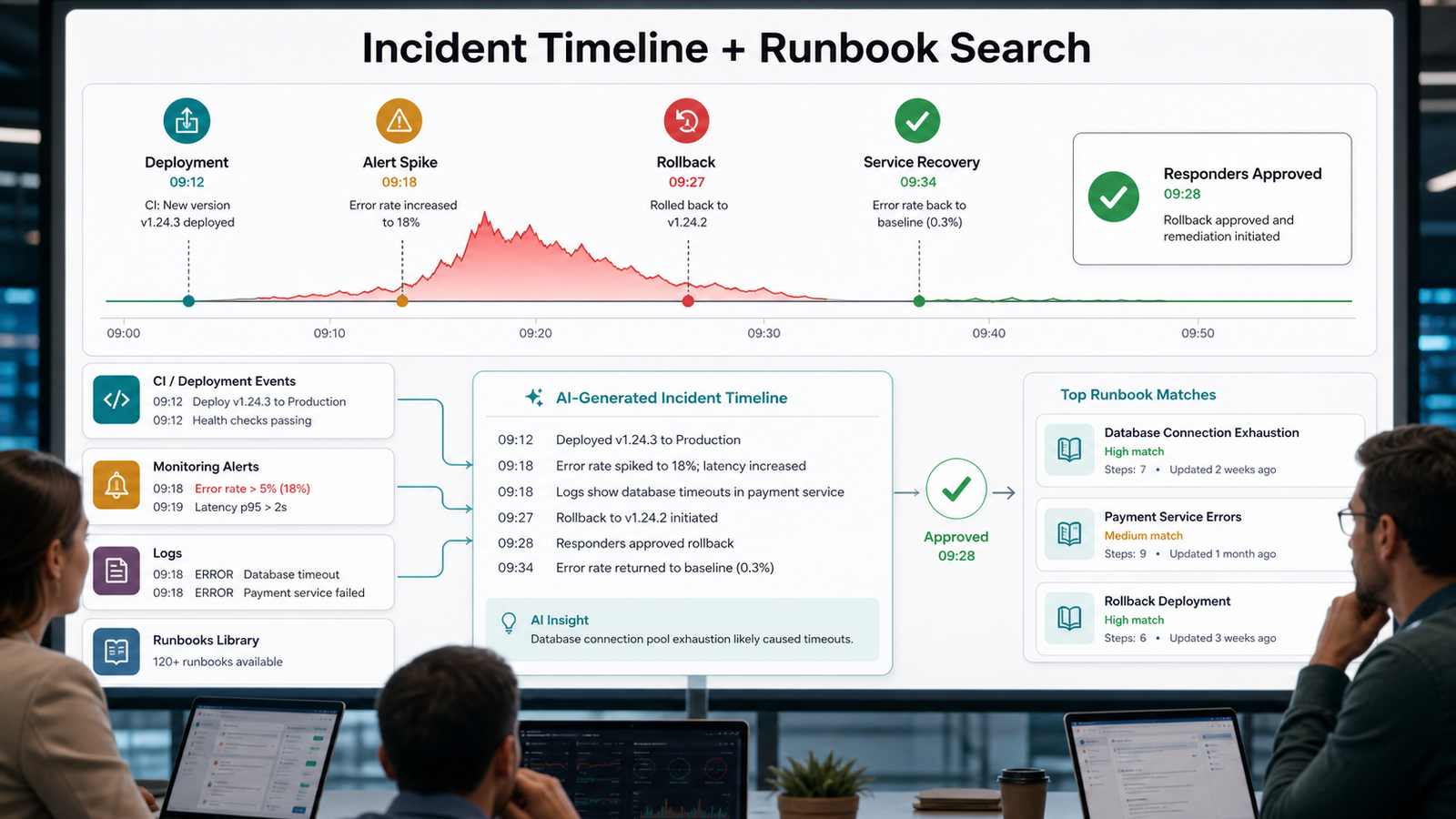
During incidents, AI is most useful when it reduces coordination overhead. It can summarize Slack or Teams updates, incident tool events, deployment timestamps, monitoring alerts, and runbook matches into a timeline.
Good output should list the deployment start, alert spike, first responder action, rollback, recovery time, likely contributing change, and a concrete follow-up. Bad output simply says “the service had an outage” and adds no evidence.
For higher maturity teams, connect incident AI to observability data, but keep write actions behind approval. A tool that can read logs is very different from a tool that can restart services, edit feature flags, or modify infrastructure.
Use Case 6: AI DevSecOps for Generated Code and Config
Search demand around AI DevOps is increasingly tied to security. That makes sense: AI now drafts application code, pipeline YAML, Dockerfiles, Terraform, and Kubernetes manifests. Every generated artifact needs the same checks as human-written code, and sometimes stricter checks because the author may not understand every line.
Use AI DevSecOps for secret detection explanations, dependency risk summaries, Dockerfile hardening suggestions, SAST triage, Terraform review, Kubernetes policy review, and threat-model prompts for new services. Pair AI with deterministic scanners. AI is good at explaining and prioritizing; scanners are better at repeatable detection.
Example pipeline:
Developer opens PR
-> CI runs tests, SAST, dependency scan, container scan, IaC scan
-> AI summarizes findings and suggests fixes
-> Human approves changes
-> Policy gate blocks critical issues
-> Deployment proceeds only if required checks pass
For a focused deep dive, link readers to AI DevSecOps Pipeline 2026.
How Beginners Should Start With AI in DevOps
If you are new to DevOps, avoid starting with autonomous agents. Start with the fundamentals and use AI to explain them.
Beginner path: learn Git, Linux basics, containers, CI/CD, and cloud fundamentals; build one small pipeline; add Docker build and test steps; deploy a simple app to a test Kubernetes cluster; then ask AI to review the YAML and explain risks.
AI can make learning faster, but it cannot replace the mental model. If you do not understand pipelines, containers, IAM, or probes, you will not know when the AI is wrong.
For AI basics, start with What is Generative AI? A Beginner’s Guide. Then connect that foundation to DevOps workflows.
How Practitioners Should Roll Out AI DevOps
For working teams, the better question is not “Which AI tool should we buy?” It is “Which workflow has enough signal, low enough risk, and enough repeated toil to justify automation?”
Selection criteria:
• Clear input data: logs, diffs, traces, metrics, plans, or tickets
• Measurable outcome: faster triage, fewer failed deploys, lower MTTR, fewer escaped defects
• Low blast radius: read-only or approval-gated first
• Auditability: every suggestion can be traced to evidence
• Integration quality: works inside existing CI, Git, observability, and ticketing systems
• Security model: least privilege, secret handling, and retention controls
• Cost model: predictable licensing and token usage
Pros include faster log analysis, less repetitive review work, better incident summaries, faster onboarding, and more consistent runbook usage. Risks include confident wrong answers, hidden security or cost impact, automation overreach, low-quality generated YAML, tool sprawl, and sensitive data leakage if prompts are not controlled.
30-Day Pilot Plan
Week 1: pick one workflow and define success. Week 2: connect read-only data such as CI logs, test output, and diffs. Week 3: require the AI to separate facts, assumptions, and next steps. Week 4: measure time-to-diagnosis, false suggestions, repeated failure categories, and developer feedback.
Common Mistakes
The common traps are easy to predict: automating production before automating review, giving AI broad permissions, ignoring messy source data, treating generated IaC as safe, and measuring “productivity” without tracking MTTR, diagnosis time, escaped defects, or change failure rate.
FAQ
Will AI replace DevOps engineers?
No, not in the way people usually mean. AI will replace some repetitive tasks: log summarization, boilerplate YAML generation, test explanation, and first-pass reviews. DevOps engineers still own judgment, architecture, reliability, cost, security, and production responsibility.
What is the best AI DevOps use case to start with?
CI/CD failure summarization is usually the best first use case because it is read-only, easy to verify, and tied to a clear pain point. Kubernetes troubleshooting and pull request review are good second steps.
Can AI deploy to production automatically?
Technically yes, but most teams should not start there. Production automation needs policy gates, rollback automation, observability, incident ownership, audit logs, and clear approval rules.
What data does AI need for DevOps?
Useful AI DevOps systems need logs, metrics, traces, CI output, deployment history, infrastructure plans, repository diffs, tickets, runbooks, and incident records. The more structured and current the data, the better the output.
Is AIOps the same as AI DevOps?
Not exactly. AIOps usually focuses on operations data such as alerts, logs, incidents, and anomaly detection. AI DevOps is broader and can include CI/CD, code review, infrastructure drafting, security checks, and release workflows.
How do I keep AI DevOps secure?
Use least-privilege access, redact secrets, avoid sending sensitive data to unapproved tools, keep humans in approval paths, log every AI action, and pair AI suggestions with deterministic scanners and policy-as-code.


