
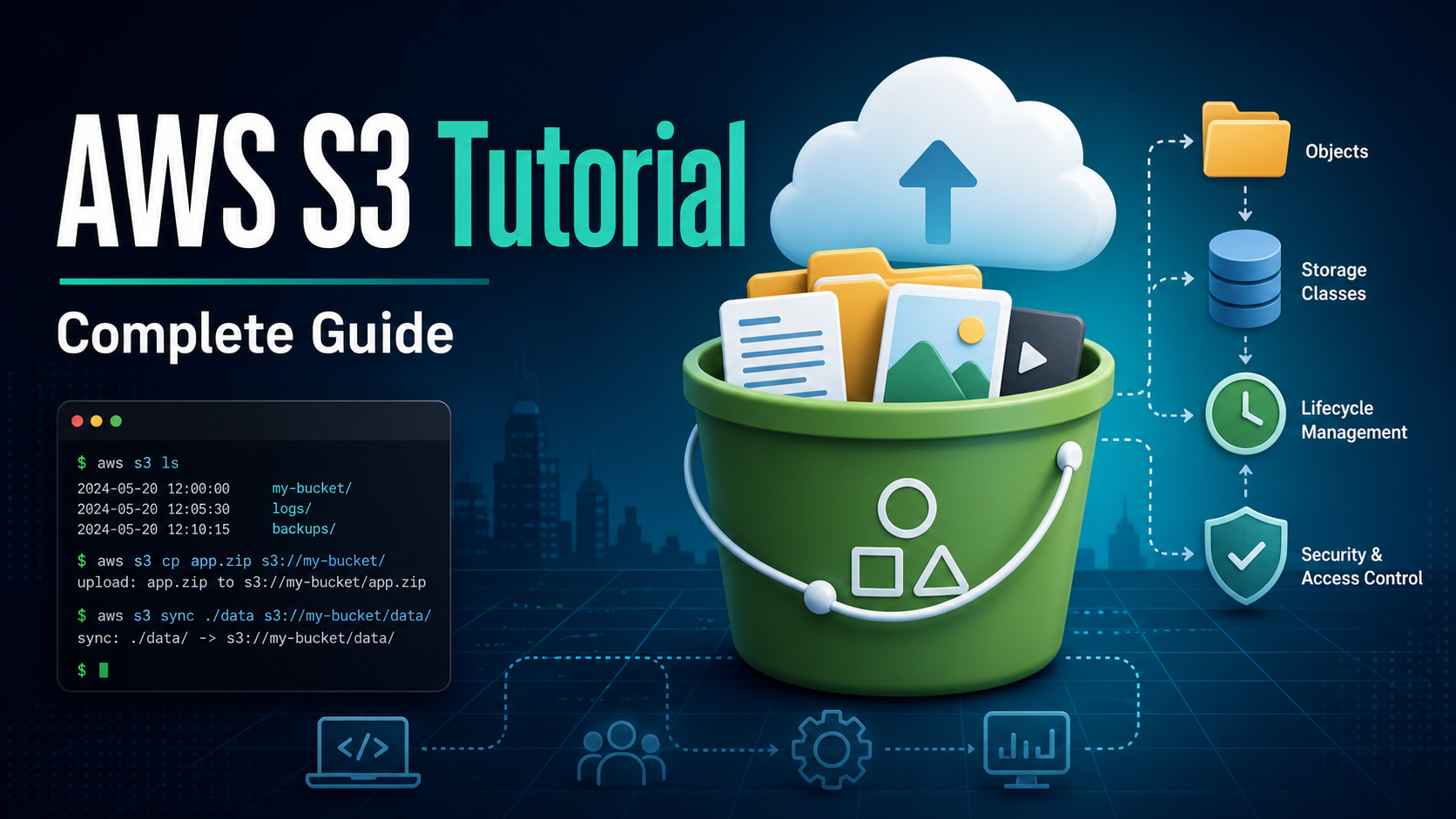

SEO excerpt: Learn Amazon S3 from scratch with practical AWS CLI examples, bucket security, versioning, lifecycle rules, storage classes, troubleshooting, and production best practices.
Quick Answer: Amazon S3 is AWS object storage for files, backups, logs, static assets, data lakes, and application artifacts. You create a bucket in a Region, upload objects with unique keys, protect access with IAM and bucket policies, enable encryption and versioning, and use lifecycle rules to move older data into cheaper storage classes or expire it safely.
If you are learning AWS, DevOps, cloud engineering, or backend development, Amazon S3 is one of the first services worth understanding deeply. It looks simple at the start: create a bucket, upload a file, download it later. In real systems, S3 becomes much more important. It can hold build artifacts, Terraform state, user uploads, logs, backups, data lake files, ML datasets, static website assets, and compliance archives.
This AWS S3 tutorial walks through the mental model, the core commands, the production settings, and the mistakes that cause most S3 incidents. The examples use the AWS CLI because it makes the service easier to understand than clicking through screens, but the same concepts apply when you use SDKs, Terraform, CloudFormation, CDK, or the AWS Console.
What Is Amazon S3?
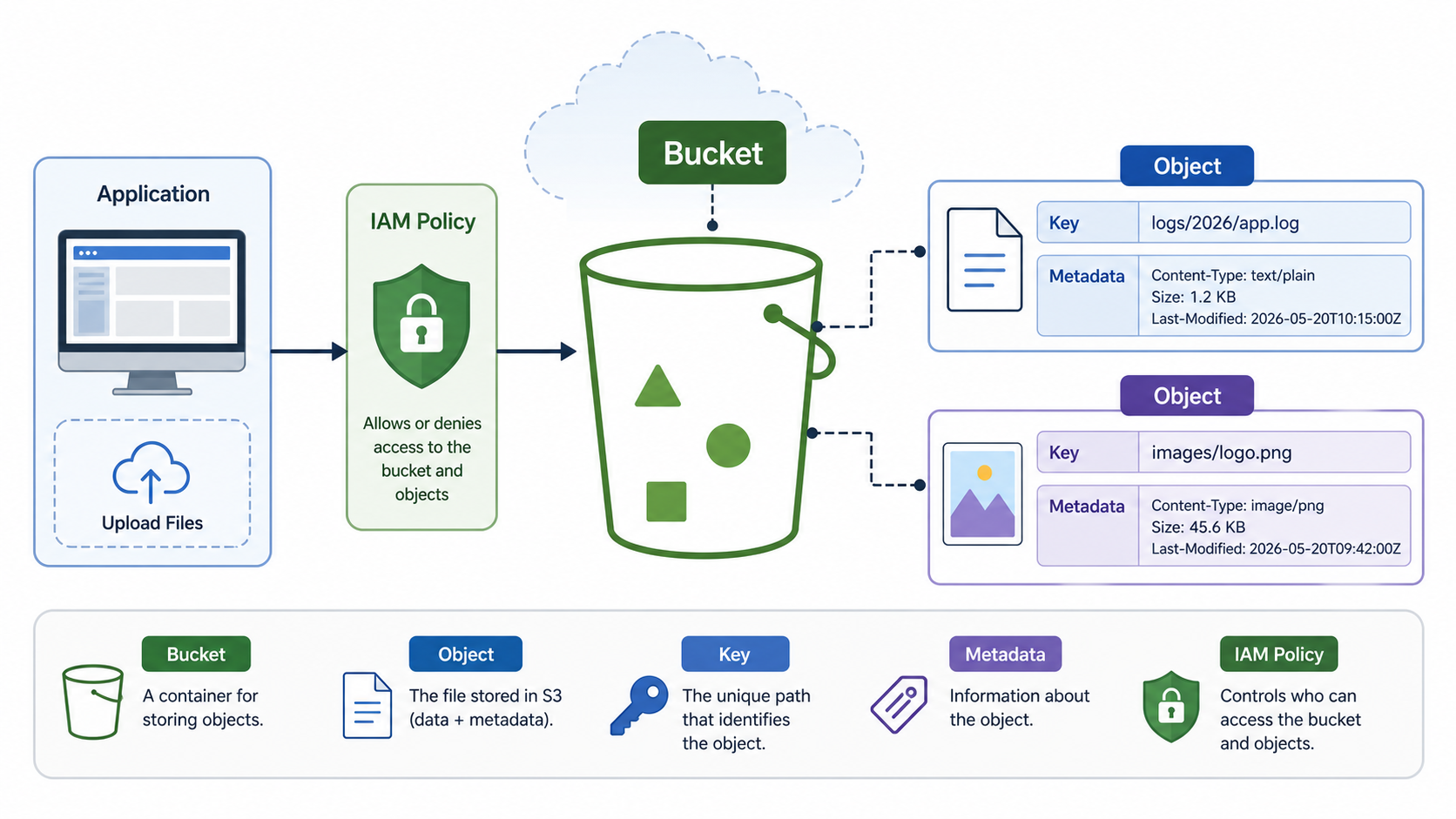
Amazon Simple Storage Service, usually called Amazon S3, is an object storage service. Instead of storing data as files in directories on a server disk, S3 stores data as objects inside buckets. Each object includes the object data, a key, and metadata. A bucket is the top-level container for those objects.
The useful way to think about S3 is this: a bucket plus an object key points to a blob of data. For example, an object key might be logs/2026/07/api.log, uploads/users/42/avatar.png, or terraform/prod/network.tfstate. The slash characters make keys look like folders, but S3 is still object storage. Your naming convention creates the structure your team sees.
When Should You Use S3?
Use S3 when you need durable, scalable storage for data that can be addressed by object key. Common examples include:
- Static assets such as images, CSS, JavaScript bundles, PDFs, and downloadable files.
- Application uploads, including user-generated documents and media.
- Backups, database exports, and disaster recovery artifacts.
- Logs from applications, load balancers, CloudTrail, and analytics pipelines.
- Data lake storage for Athena, Glue, EMR, Spark, and ML workflows.
- CI/CD build artifacts, release bundles, and deployment packages.
- Terraform remote state, with locking handled separately through a suitable backend setup.
Avoid treating S3 like a traditional block disk. If your application needs low-latency random writes to a mounted filesystem, use EBS, EFS, FSx, or a database. If you need object storage with HTTP access, event triggers, lifecycle policies, and cloud-native integrations, S3 is usually the right starting point.
Core S3 Concepts Beginners Must Know
Buckets
A bucket is the container for objects. For most workloads, you create a general purpose bucket in one AWS Region. Bucket names must be unique within the relevant namespace, and after you create a bucket, you cannot change its name or Region. Pick a name that includes the application, environment, account purpose, and sometimes the Region.
good: acme-prod-app-uploads-us-east-1
good: acme-dev-build-artifacts
bad: files
bad: mybucket123
Objects and Keys
An object is the data you upload. The key is the object’s unique name inside the bucket. Design keys for how humans and systems will query, expire, and secure the data. Prefixes such as logs/, uploads/, and exports/ are useful because lifecycle rules, IAM policies, and analytics jobs can target them.
Metadata and Tags
Metadata describes an object. Some metadata is controlled by S3, such as last modified time and content type. You can also add custom metadata when uploading. Tags are separate key-value pairs that are useful for lifecycle, cost allocation, access control, and automation. For example, you might tag objects with project=payments or retention=90-days.
Storage Classes
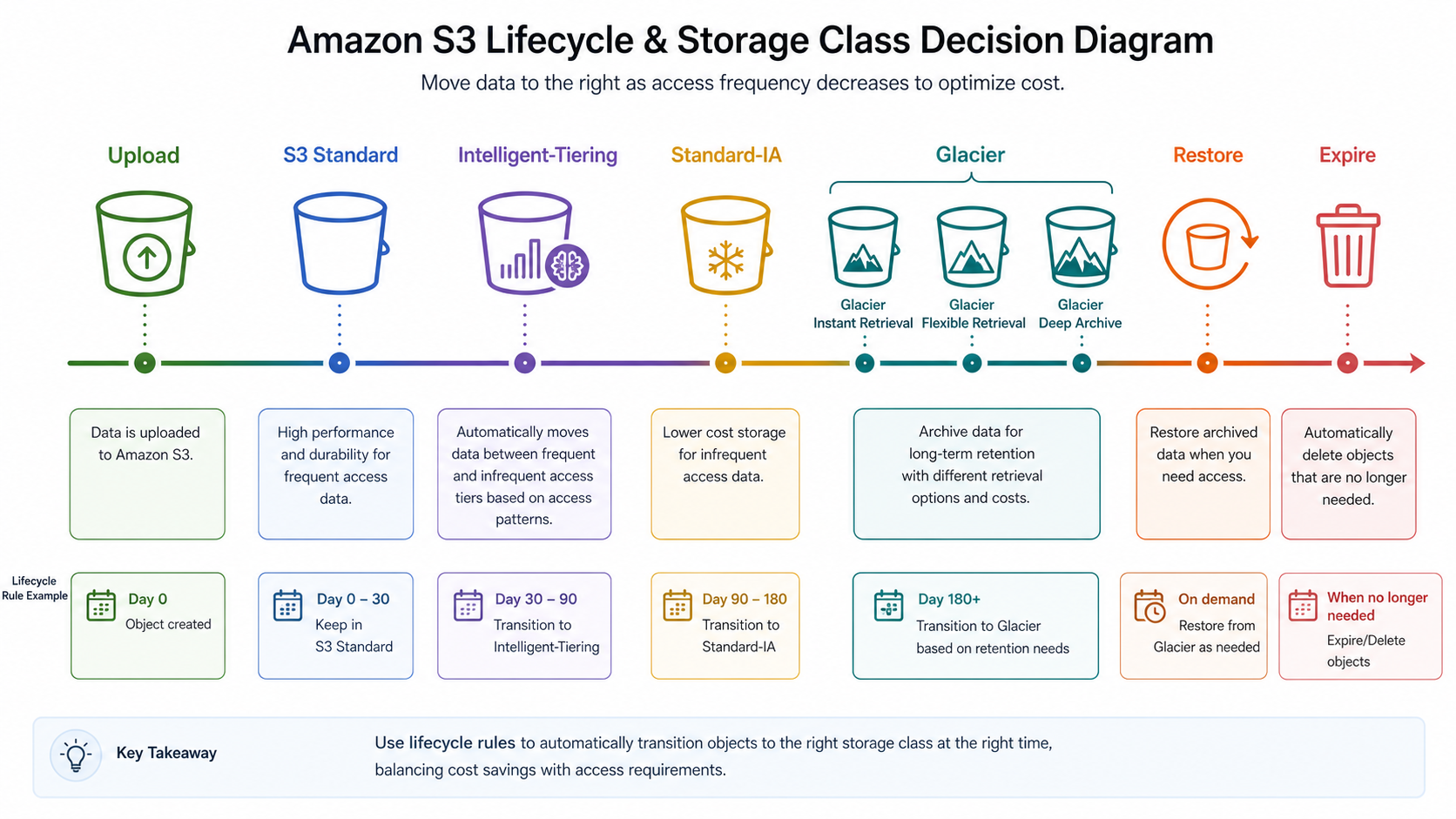
S3 storage classes let you trade off access frequency, retrieval behavior, resilience model, and cost. For new production workloads with unknown access patterns, S3 Standard is the safest default. When data becomes less frequently accessed, lifecycle rules can transition it to classes such as S3 Standard-IA, S3 One Zone-IA, S3 Glacier Instant Retrieval, S3 Glacier Flexible Retrieval, or S3 Glacier Deep Archive. S3 Intelligent-Tiering can help when access patterns are unknown or changing.
Prerequisites for This Tutorial
- An AWS account.
- A configured AWS CLI profile.
- An IAM identity with permission to create and manage an S3 bucket for learning.
- A terminal with AWS CLI v2 installed.
Check your identity before creating resources:
aws sts get-caller-identity
Set a few variables to make the examples easier to copy. Bucket names must be globally unique, so replace the suffix with your own account or project identifier.
export AWS_REGION=us-east-1
export BUCKET_NAME=gravitydevops-s3-tutorial-$(date +%s)
Step 1: Create an S3 Bucket
For us-east-1, bucket creation is slightly different than other Regions. This example handles the common case for us-east-1:
aws s3api create-bucket \
  --bucket "$BUCKET_NAME" \
  --region "$AWS_REGION"
For another Region, include the location constraint:
export AWS_REGION=ap-south-1

aws s3api create-bucket \
  --bucket "$BUCKET_NAME" \
  --region "$AWS_REGION" \
  --create-bucket-configuration LocationConstraint="$AWS_REGION"
Verify the bucket exists:
aws s3api head-bucket --bucket "$BUCKET_NAME"
Step 2: Upload, List, Download, and Delete Objects
Create a sample file and upload it with a structured key:
echo "hello from s3" > hello.txt

aws s3 cp hello.txt "s3://$BUCKET_NAME/tutorial/hello.txt"
List objects under a prefix:
aws s3 ls "s3://$BUCKET_NAME/tutorial/"
Download the object:
aws s3 cp "s3://$BUCKET_NAME/tutorial/hello.txt" downloaded-hello.txt
cat downloaded-hello.txt
Delete it when finished:
aws s3 rm "s3://$BUCKET_NAME/tutorial/hello.txt"
The aws s3 commands are convenient for everyday file operations. The aws s3api commands expose lower-level S3 API features and are better for precise automation.
Step 3: Enable Block Public Access
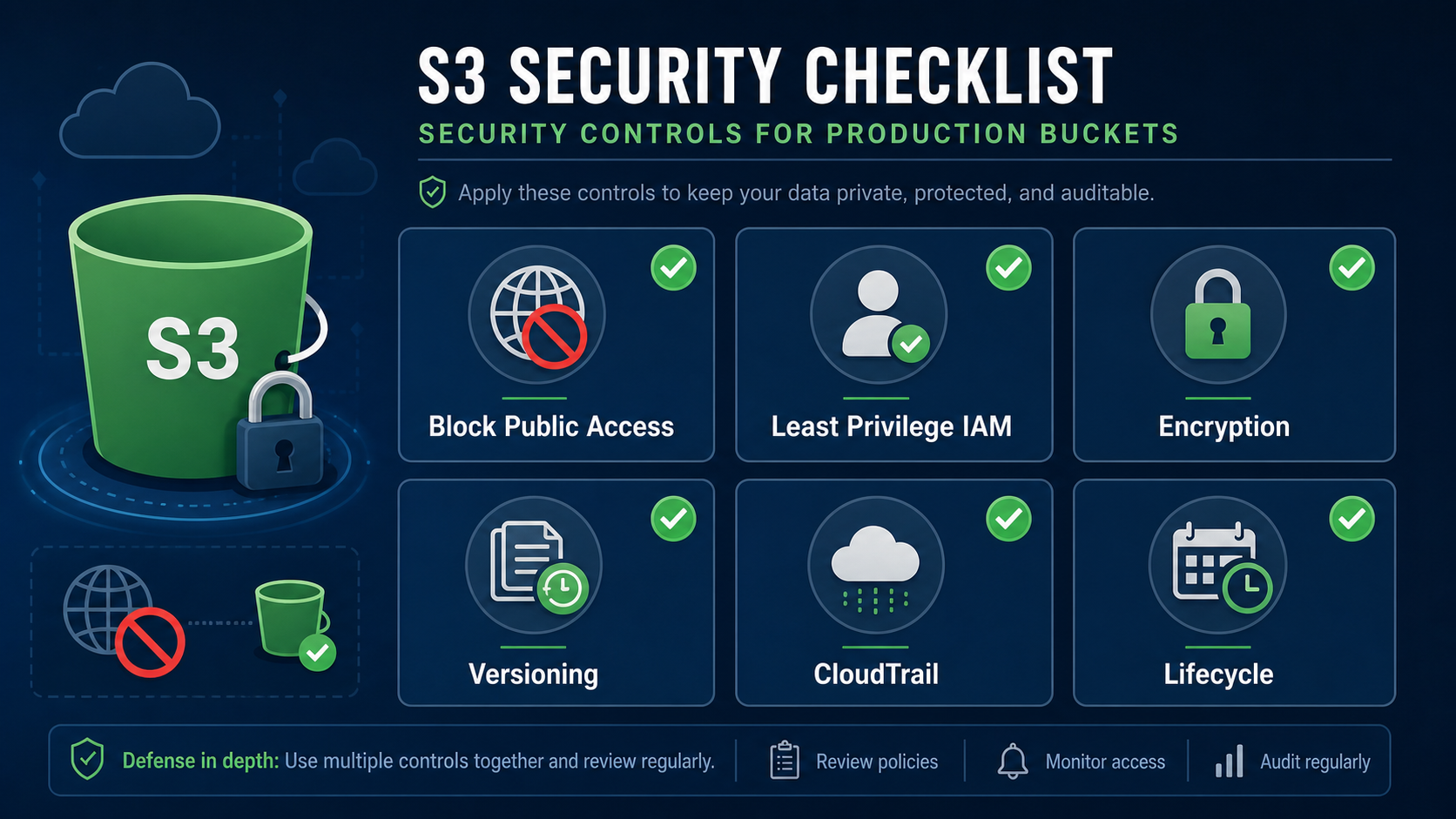
S3 buckets and objects are private by default, and modern buckets commonly have Block Public Access enabled. Keep it enabled unless you are intentionally hosting public content and understand the risk.
aws s3api put-public-access-block \
  --bucket "$BUCKET_NAME" \
  --public-access-block-configuration \
  BlockPublicAcls=true,IgnorePublicAcls=true,BlockPublicPolicy=true,RestrictPublicBuckets=true
For websites, prefer CloudFront with Origin Access Control in front of a private S3 bucket. Making a bucket public is rarely the right default for production.
Step 4: Turn On Default Encryption
S3 supports server-side encryption. Many teams use SSE-S3 for general workloads and SSE-KMS when they need stricter key control, audit trails, or key policies. Here is the simple SSE-S3 configuration:
aws s3api put-bucket-encryption \
  --bucket "$BUCKET_NAME" \
  --server-side-encryption-configuration '{
    "Rules": [
      {
        "ApplyServerSideEncryptionByDefault": {
          "SSEAlgorithm": "AES256"
        }
      }
    ]
  }'
If your organization standardizes on AWS KMS, use aws:kms and a specific KMS key. Remember that KMS permissions and request volume become part of your application design.
Step 5: Enable Versioning
Versioning keeps multiple versions of an object in the same bucket. It is useful when users overwrite files, deployment jobs replace artifacts, or a bad script deletes data. Versioning is not a complete backup strategy by itself, but it gives you a strong recovery layer.
aws s3api put-bucket-versioning \
  --bucket "$BUCKET_NAME" \
  --versioning-configuration Status=Enabled
Test it:
echo "v1" > config.txt
aws s3 cp config.txt "s3://$BUCKET_NAME/app/config.txt"

echo "v2" > config.txt
aws s3 cp config.txt "s3://$BUCKET_NAME/app/config.txt"

aws s3api list-object-versions \
  --bucket "$BUCKET_NAME" \
  --prefix app/config.txt
Important warning: versioning can increase storage costs because old versions remain billable until lifecycle rules remove them. Always pair versioning with a lifecycle policy for noncurrent versions.
Step 6: Add a Lifecycle Rule
Lifecycle rules automate cost control and retention. You can transition objects to cheaper storage classes, expire temporary files, and remove old noncurrent versions. A practical starter policy might expire temporary files after 7 days and remove noncurrent versions after 30 days.
cat > lifecycle.json <<'JSON'
{
  "Rules": [
    {
      "ID": "expire-temporary-files",
      "Status": "Enabled",
      "Filter": { "Prefix": "tmp/" },
      "Expiration": { "Days": 7 }
    },
    {
      "ID": "clean-old-versions",
      "Status": "Enabled",
      "Filter": { "Prefix": "" },
      "NoncurrentVersionExpiration": { "NoncurrentDays": 30 }
    }
  ]
}
JSON

aws s3api put-bucket-lifecycle-configuration \
  --bucket "$BUCKET_NAME" \
  --lifecycle-configuration file://lifecycle.json
Do not blindly transition everything to archive storage. Glacier classes can be excellent for compliance archives and rarely accessed backups, but restore behavior matters. A log file needed during an incident should not be buried in an archive tier that takes too long for your recovery objective.
Step 7: Write a Least-Privilege IAM Policy
The best S3 security pattern is to give each application only the bucket and prefix it needs. This example allows read and write access only under uploads/ in one bucket:
{
  "Version": "2012-10-17",
  "Statement": [
    {
      "Effect": "Allow",
      "Action": [
        "s3:PutObject",
        "s3:GetObject",
        "s3:DeleteObject"
      ],
      "Resource": "arn:aws:s3:::YOUR_BUCKET_NAME/uploads/*"
    },
    {
      "Effect": "Allow",
      "Action": "s3:ListBucket",
      "Resource": "arn:aws:s3:::YOUR_BUCKET_NAME",
      "Condition": {
        "StringLike": {
          "s3:prefix": "uploads/*"
        }
      }
    }
  ]
}
Notice the split between object actions and bucket listing. Object operations use the bucket ARN with a key path. Listing uses the bucket ARN and a condition on the prefix.
Step 8: Use Presigned URLs for Temporary Access
Applications often need to let a browser upload or download a private object without making the bucket public. Presigned URLs solve that by creating a temporary, signed URL for a specific action.
aws s3 presign "s3://$BUCKET_NAME/uploads/report.pdf" \
  --expires-in 900
Use short expirations, validate file type and size in your application, and avoid granting broad permissions to the identity that creates presigned URLs.
Step 9: Monitor and Audit S3
Production S3 buckets should be observable. At minimum, review CloudTrail activity, monitor storage growth, and use AWS billing alerts. For larger estates, S3 Storage Lens and S3 Inventory help you understand object counts, storage classes, encryption status, replication status, and lifecycle coverage.
Useful questions to ask during reviews:
- Which buckets are growing fastest?
- Which prefixes have no lifecycle policy?
- Which buckets allow public access?
- Which objects are unencrypted or missing expected tags?
- Which applications are making the most expensive request patterns?
S3 Storage Class Cheat Sheet
| Storage class | Good fit | Watch out for |
|---|---|---|
| S3 Standard | Frequently accessed production data, active application assets | Higher storage cost than infrequent/archive classes |
| S3 Intelligent-Tiering | Unknown or changing access patterns | Monitoring/automation charges and archive tier behavior |
| S3 Standard-IA | Infrequently accessed data that still needs quick access | Retrieval charges and minimum storage duration |
| S3 One Zone-IA | Re-creatable infrequently accessed data in one Availability Zone | Lower resilience model than multi-AZ classes |
| S3 Glacier Instant Retrieval | Archive data that needs millisecond retrieval | Retrieval cost and archive use-case fit |
| S3 Glacier Flexible Retrieval | Backups and archives where minutes to hours can be acceptable | Restore workflow required before normal use |
| S3 Glacier Deep Archive | Long-term compliance archives rarely restored | Slow retrieval; not suitable for urgent operations |
| S3 Express One Zone | Latency-sensitive workloads using directory buckets | Single-AZ design and workload-specific bucket model |
Common S3 Mistakes
- Making buckets public for convenience: Use private buckets, IAM, CloudFront, and presigned URLs instead.
- Skipping lifecycle rules: Old logs, old versions, and temporary exports can quietly become expensive.
- Using one bucket for everything: Separate data by application, environment, risk level, and ownership when it improves access control and operations.
- Writing broad IAM policies: Avoid
s3:*on all buckets. Scope actions, resources, and prefixes. - Forgetting version cleanup: Versioning helps recovery, but noncurrent versions still cost money.
- Assuming folders are real directories: S3 keys can use slash-like prefixes, but S3 is object storage. Design around prefixes, not filesystem assumptions.
- Not setting content types: Web assets need correct
Content-Typemetadata or browsers and CDNs can behave incorrectly.
Troubleshooting S3 Errors
AccessDenied
Check IAM identity policies, bucket policies, service control policies, KMS key permissions, and Block Public Access settings. For list operations, confirm the identity has s3:ListBucket on the bucket ARN. For object operations, confirm it has permissions on the object ARN.
NoSuchBucket
Check the bucket name, AWS account, and Region. Bucket names are global-looking, but bucket location still matters for API calls and integrations.
SignatureDoesNotMatch
This often happens with incorrect credentials, wrong Region, expired presigned URLs, clock skew, or a request modified after signing. Regenerate the URL and confirm the client uses it exactly as issued.
Slow Uploads or Downloads
Use multipart uploads for large objects, keep compute near the bucket Region when possible, review network paths, and consider S3 Transfer Acceleration only when it fits the workload and cost profile. AWS also recommends scaling request rates by using concurrent connections and designing key naming and prefixes with the workload in mind.
Production Checklist
- Create buckets through infrastructure as code, not manual clicks.
- Keep Block Public Access enabled unless there is a documented exception.
- Use least-privilege IAM and prefix-level access where practical.
- Enable default encryption and decide whether SSE-S3 or SSE-KMS fits the workload.
- Enable versioning for important data and configure lifecycle cleanup.
- Use lifecycle rules for temporary files, logs, archives, and old versions.
- Tag buckets and objects for cost allocation and ownership.
- Monitor with CloudTrail, billing alerts, Storage Lens, or inventory reports.
- Put CloudFront in front of public web assets instead of exposing buckets directly.
- Document restore steps for archived data before an incident happens.
How S3 Fits With DevOps Workflows
S3 is not just a storage service. In DevOps workflows, it often becomes the shared handoff point between systems. CI pipelines upload build artifacts. Deployment tools fetch release bundles. Terraform stores state. Kubernetes workloads write backups. Log pipelines deliver raw data for later analysis. ML pipelines stage datasets and model artifacts.
If you are building a broader cloud learning path, pair this S3 foundation with managed Kubernetes, CI/CD, and infrastructure as code. GravityDevOps readers may also find these related guides useful: Amazon EKS Tutorial: Kubernetes on AWS, Best CI/CD Tools 2026 Compared, AWS vs Azure vs Google Cloud: Which to Learn in 2026, and What Is Generative AI? Beginner’s Guide.
FAQ
Is Amazon S3 a database?
No. Amazon S3 is object storage. It can store files, logs, exports, datasets, and application objects, but it is not a relational or document database. Use a database when you need queries, transactions, indexes, and frequent updates to small records.
Is S3 the same as a filesystem?
No. S3 object keys can look like file paths, but S3 is not a traditional filesystem. There are no real folders in the same sense as a local disk. Prefixes are naming patterns that tools can display like folders.
Should every S3 bucket be private?
Private should be the default. Public buckets are only appropriate for specific, reviewed use cases. For most web delivery, keep S3 private and use CloudFront, signed URLs, or presigned URLs depending on the access pattern.
What is the best S3 storage class for beginners?
Start with S3 Standard for active data. Add lifecycle rules after you understand access patterns. For data with unpredictable access, evaluate S3 Intelligent-Tiering. For archives, choose a Glacier class only after confirming restore expectations.
Does S3 versioning protect against accidental deletion?
Versioning helps because deleted objects receive delete markers and older versions can often be restored. It is not a replacement for backup, replication, access controls, or lifecycle planning.
How do I reduce S3 costs?
Use lifecycle policies, delete temporary files, clean up old versions, choose storage classes based on access patterns, compress suitable data, review request-heavy workloads, and monitor growth with billing alerts or S3 Storage Lens.
FAQ Schema
Internal Link Suggestions
- Amazon EKS Tutorial: Kubernetes on AWS for teams storing Kubernetes backups, manifests, and app artifacts.
- Best CI/CD Tools 2026 Compared for artifact publishing and deployment pipelines.
- AWS vs Azure vs Google Cloud: Which to Learn in 2026 for cloud learning path context.
- What Is Generative AI? Beginner’s Guide for readers using S3 as dataset or model artifact storage.


