
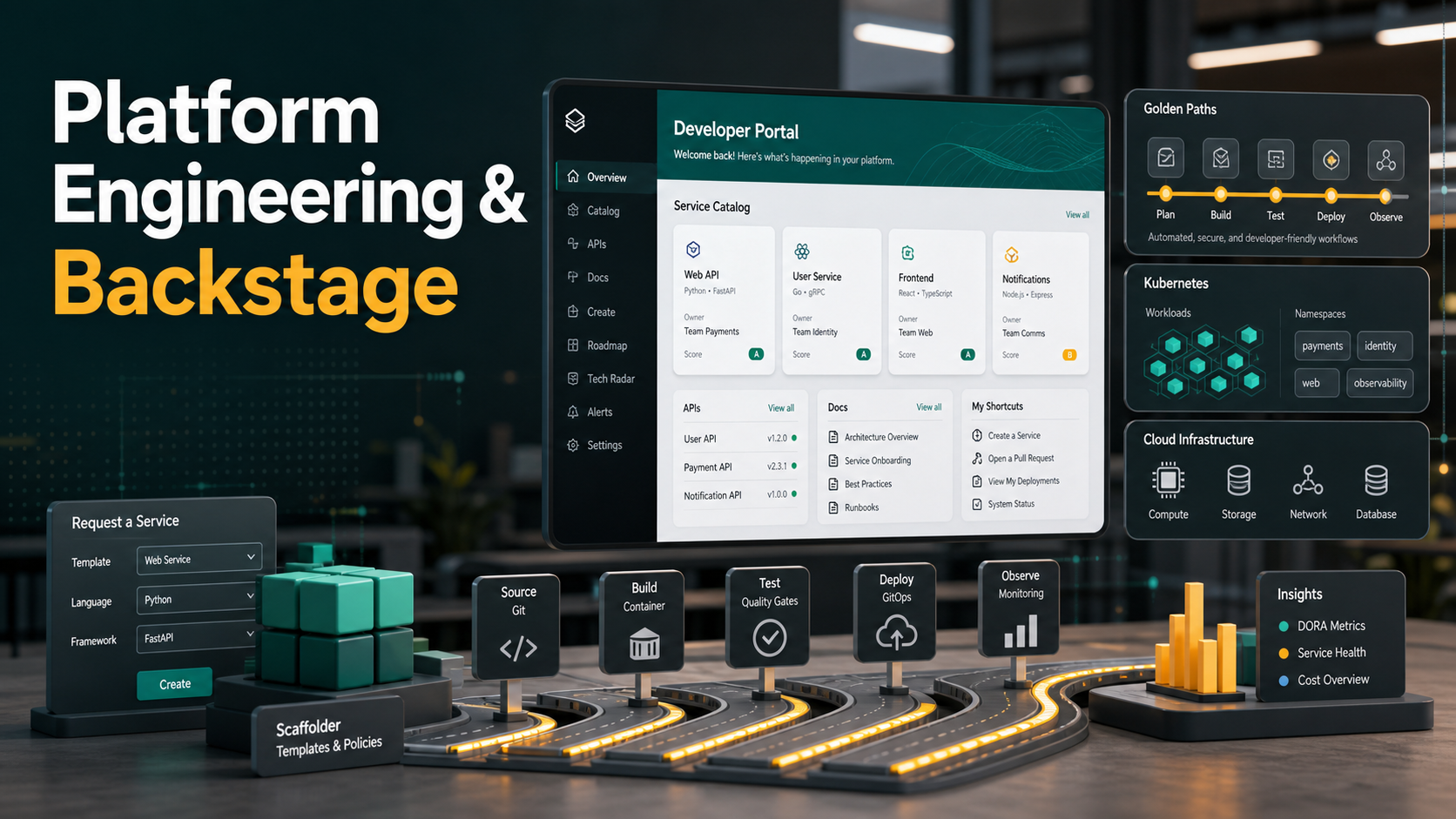

Quick Answer: Platform engineering is the practice of treating internal delivery capabilities as a product for developers. Backstage is an open source framework for building an internal developer portal on top of those capabilities. Used together, they can give teams a software catalog, golden-path templates, documentation, ownership data, service health, and self-service workflows in one place.
If your developers need to open five dashboards, ask three Slack channels, and copy an old repository just to launch a new service, you do not have a developer experience problem only. You have a platform problem. Platform engineering solves this by building paved workflows that make the safe path the easiest path. Backstage is often the developer-facing portal that brings those workflows together.
This guide explains what platform engineering is, where Backstage fits, how to design a useful internal developer platform, and how to start without building a complicated portal that nobody uses.
What Is Platform Engineering?
Platform engineering is the discipline of building internal platforms that help software teams deliver applications with less friction and better operational consistency. The platform team provides reusable capabilities such as service creation, CI/CD pipelines, Kubernetes deployment patterns, infrastructure provisioning, security controls, observability, documentation, and incident ownership.
The important shift is product thinking. A platform is not just a pile of scripts owned by the DevOps team. It is an internal product with users, adoption goals, feedback loops, documentation, support expectations, and measurable outcomes. CNCF’s platform engineering maturity model frames platform engineering as a way to offer an internal platform as a product across people, process, policy, technology, and business outcomes.
A good platform does not hide every detail from developers. It hides unnecessary complexity while preserving useful context. Developers still understand what they own, how their service runs, where logs and metrics live, how deployments work, and what standards apply.
What Is Backstage?
Backstage is an open source framework for building developer portals. It was originally created at Spotify and is now part of the CNCF ecosystem. The official Backstage docs describe it as a portal powered by a centralized software catalog that brings services, infrastructure, tooling, and documentation into a streamlined developer environment.
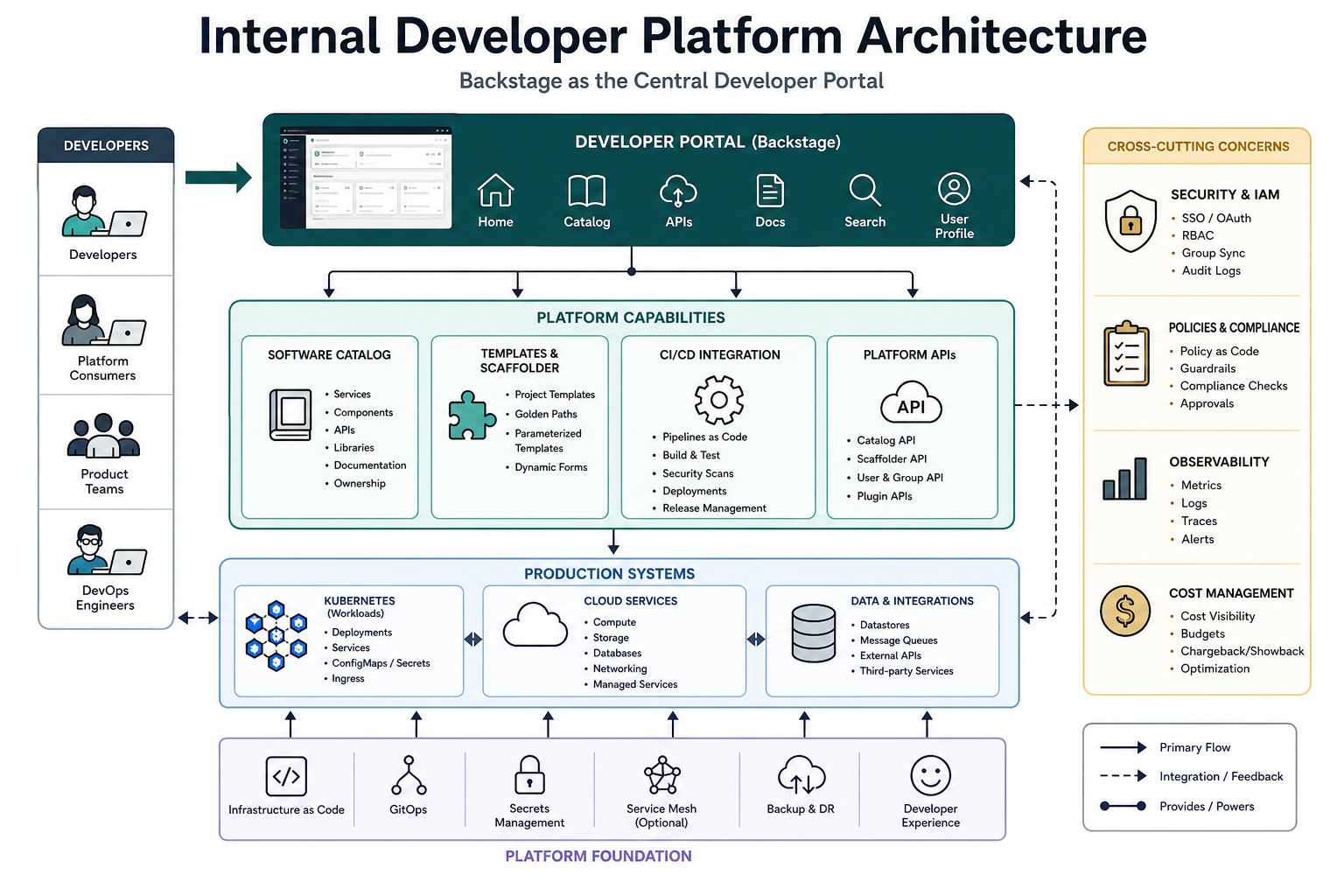
Backstage is not the whole internal developer platform by itself. It is usually the front door. The actual platform includes the automation, infrastructure, CI/CD systems, policy engines, observability tools, secrets management, runtime environments, and support processes behind that portal.
Platform Engineering vs DevOps vs SRE
Platform engineering does not replace DevOps or SRE. It usually grows out of both.
| Discipline | Main focus | Typical output |
|---|---|---|
| DevOps | Improving collaboration between development and operations | Automation, shared ownership, faster delivery |
| SRE | Reliability, operability, incident response, service-level objectives | SLOs, error budgets, operational practices |
| Platform engineering | Reusable internal product for developer self-service | Internal developer platform, golden paths, service catalog |
A practical way to think about it: DevOps is a culture and operating model, SRE is a reliability discipline, and platform engineering is a product-oriented implementation that makes good delivery practices easier to adopt.
Why Teams Adopt Backstage for Platform Engineering
Backstage is popular because platform teams often need a common developer-facing layer. Without a portal, every capability becomes another URL, CLI, wiki page, or ticket queue. Backstage can reduce that sprawl by giving developers one place to discover services, templates, docs, APIs, owners, and operational signals.
Backstage’s core building blocks are especially relevant for platform teams:
- Software Catalog: a searchable inventory of services, libraries, websites, data pipelines, APIs, and owners.
- Software Templates: self-service scaffolding for new services, repositories, pipelines, and infrastructure patterns.
- TechDocs: documentation stored near code and rendered in the portal.
- Plugin architecture: integrations for CI/CD, Kubernetes, security, observability, cloud providers, incident tools, and internal systems.
- Ownership metadata: a way to make responsibility visible instead of tribal knowledge.
The Internal Developer Platform Architecture
A useful platform architecture normally has three layers.
1. Developer Experience Layer
This is where Backstage usually sits. Developers use it to find services, create new applications, view documentation, inspect ownership, and navigate to operational tools. The portal should answer daily questions quickly:
- Who owns this service?
- Where is the runbook?
- How do I create a new API service?
- Which pipeline deployed the current version?
- Where are logs, traces, dashboards, and alerts?
2. Platform Capability Layer
This is the automation behind the portal. It includes CI/CD workflows, infrastructure modules, Kubernetes templates, secrets management, policy checks, security scanning, service mesh configuration, observability setup, and environment provisioning. Backstage should call or link to these capabilities; it should not become a dumping ground for every possible platform concern.
3. Runtime and Operations Layer
This includes Kubernetes clusters, cloud accounts, managed databases, queues, storage, monitoring systems, incident platforms, and cost management. The portal should expose enough information for developers to operate responsibly, but the runtime layer still needs strong engineering foundations.
How the Backstage Software Catalog Works
The software catalog is the heart of most Backstage portals. It stores metadata about software components and their relationships. A service can have an owner, lifecycle stage, system, domain, documentation link, API definition, repository, dependencies, and operational links.
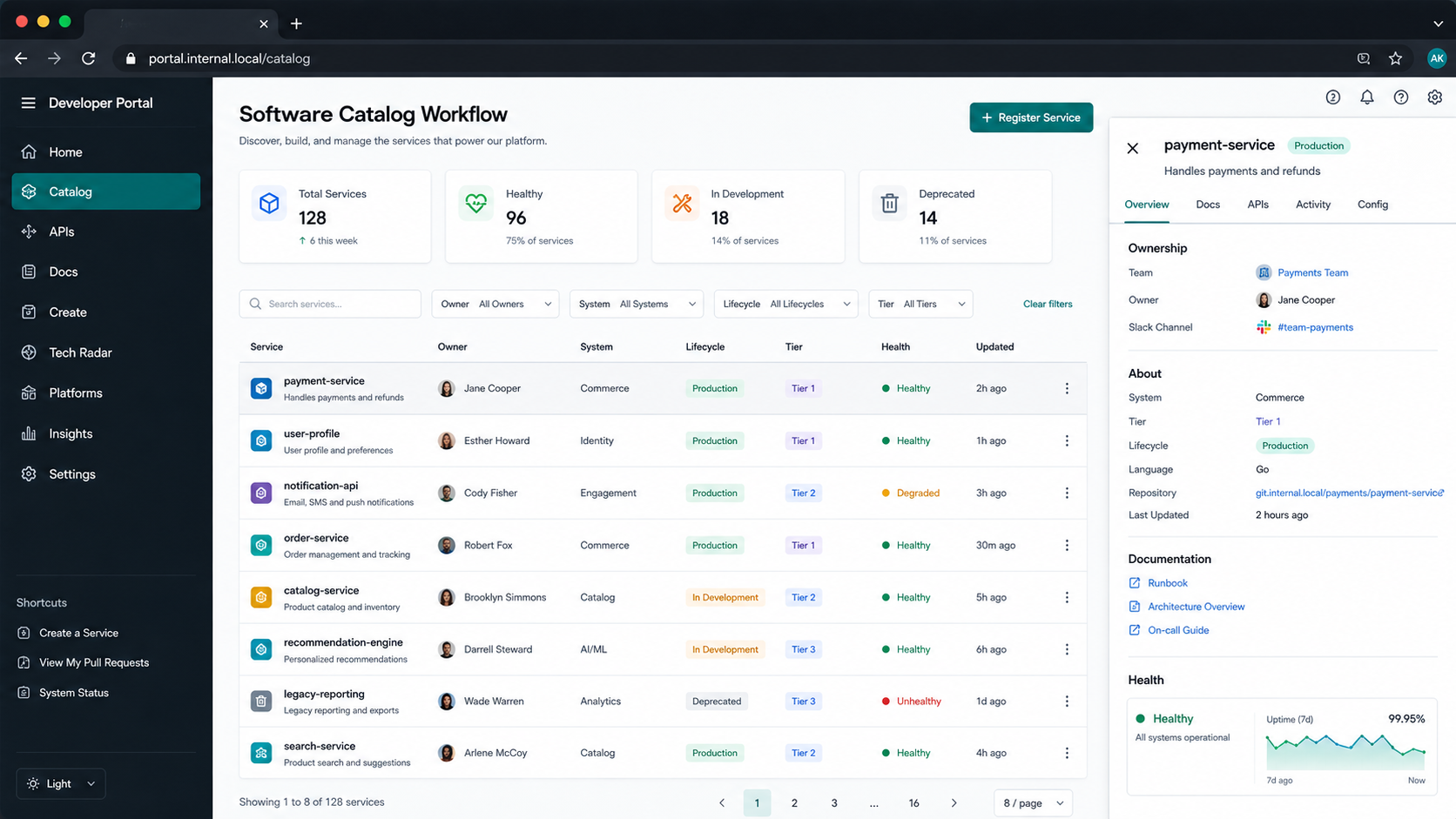
A simple catalog entity usually starts with a catalog-info.yaml file in the service repository:
apiVersion: backstage.io/v1alpha1
kind: Component
metadata:
  name: payments-api
  description: Handles payment authorization and refunds
  annotations:
    github.com/project-slug: example-org/payments-api
    backstage.io/techdocs-ref: dir:.
spec:
  type: service
  lifecycle: production
  owner: team-payments
  system: commerce-platform
This looks small, but the impact is large. Once catalog metadata is reliable, teams can answer ownership, documentation, runtime, and dependency questions without chasing people. That makes incident response easier and reduces onboarding friction for new engineers.
Golden Paths: The Most Valuable Platform Feature
A golden path is a recommended workflow for a common engineering task. It is not just a template. It combines defaults, automation, security controls, documentation, observability, and team ownership into a repeatable path.
For example, a golden path for a new API service might:
- Create a repository from an approved template.
- Add standard CI checks, dependency scanning, and container build steps.
- Create infrastructure through Terraform, OpenTofu, Crossplane, or another approved system.
- Configure Kubernetes manifests or Helm charts.
- Register the service in Backstage.
- Add TechDocs, runbook stubs, and ownership metadata.
- Connect dashboards, alerts, logs, and traces.
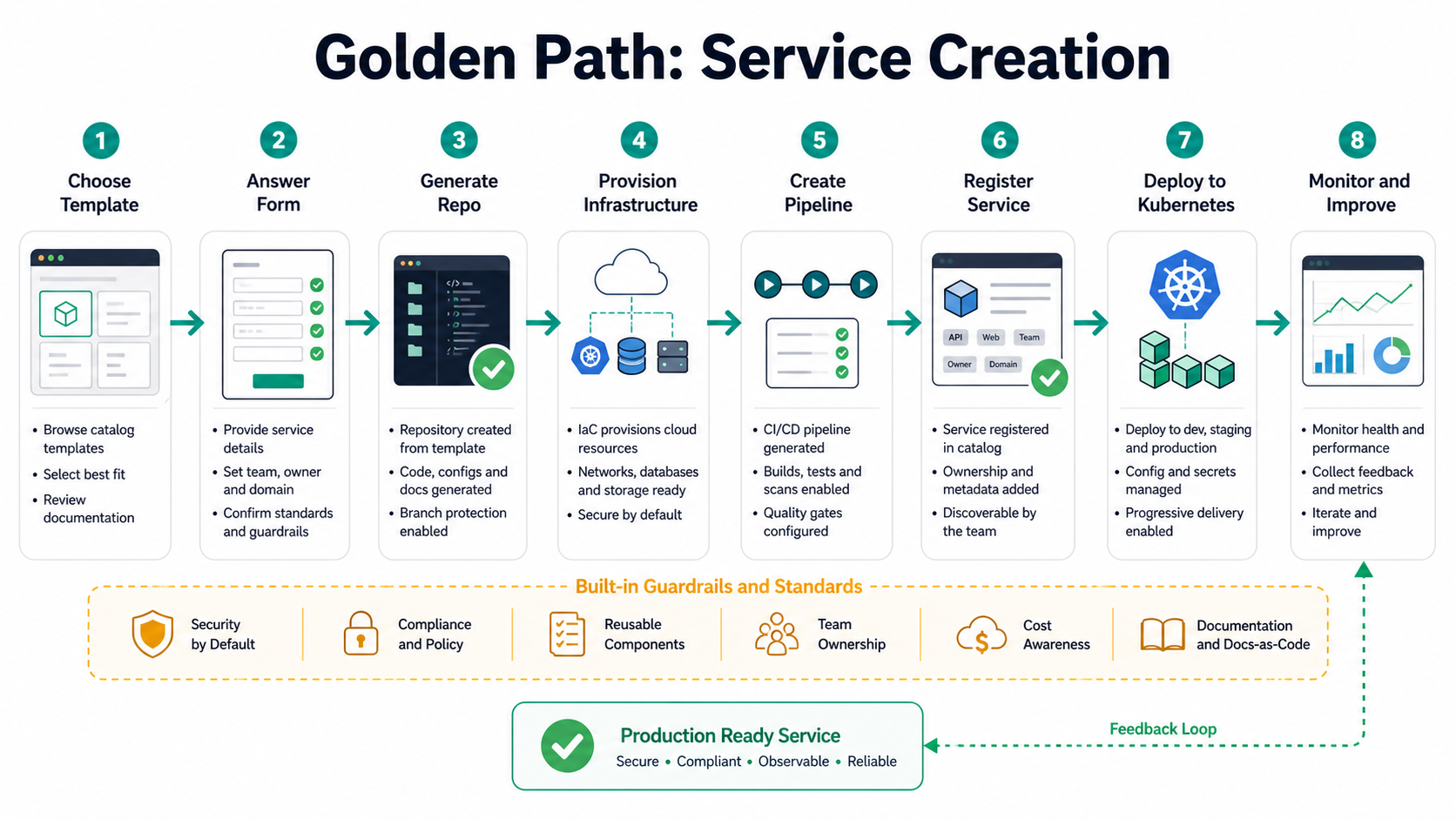
Backstage Software Templates are a strong fit for this. A template can present a form to the developer, collect inputs such as service name, owner, language, and runtime, then execute steps to generate a repository and register it in the catalog.
Beginner Tutorial: Design a Backstage MVP
Do not start by integrating every tool. Start with one painful developer workflow and make it noticeably easier.
Step 1: Pick the first use case
Good starter use cases are narrow and high-frequency:
- Create a new service with approved defaults.
- Find service ownership and documentation.
- Standardize Kubernetes deployment visibility.
- Show CI/CD status and production links in one service page.
Avoid starting with a broad executive dashboard. Developers adopt portals when the portal helps them complete real work.
Step 2: Define minimum catalog metadata
Require only the fields you can maintain:
name: unique service name.owner: team or group responsible for the service.type: service, website, library, API, job, or data pipeline.lifecycle: experimental, production, deprecated, or similar.system: business or platform system the component belongs to.
Do not make teams fill out 40 fields on day one. Catalog quality improves when the metadata has obvious daily value.
Step 3: Install Backstage locally for evaluation
For a proof of concept, follow the official Backstage installation path and run it locally. A typical evaluation flow looks like this:
npx @backstage/create-app@latest
cd my-backstage-app
yarn install
yarn dev
Then add a few real services to the catalog and test whether developers can find ownership, docs, and operational links faster than before.
Step 4: Add one template
Create one template for a common service type. Keep the first version simple: repository skeleton, README, catalog metadata, CI workflow, Dockerfile, and a basic deployment path. Add more automation only after teams use the template and give feedback.
Step 5: Connect one operational signal
A portal becomes more useful when it shows real service context. Start with one of these:
- CI build status.
- Kubernetes workload status.
- Production dashboard link.
- On-call schedule link.
- Service-level objective summary.
Backstage Implementation Checklist
Use this checklist before promoting a Backstage MVP beyond a small pilot.
| Area | Question to answer | Practical standard |
|---|---|---|
| Ownership | Can every production service be mapped to a team? | No orphaned critical services. |
| Catalog quality | Is metadata generated or reviewed? | Metadata is checked in CI or reviewed during onboarding. |
| Templates | Do templates reflect real production standards? | Templates include security, docs, CI/CD, observability, and ownership. |
| Security | Who can execute scaffolder actions? | Permissions are scoped, audited, and reviewed. |
| Docs | Can teams maintain docs near code? | TechDocs or equivalent docs-as-code flow is in place. |
| Adoption | Are developers using the portal weekly? | Measure active users, template runs, catalog coverage, and feedback. |
Common Mistakes
Building a portal before building a platform
A beautiful portal cannot compensate for unreliable automation. If service creation still requires manual tickets behind the scenes, developers will notice. Build enough platform capability for the portal to perform real work.
Treating Backstage as a wiki
Backstage can surface documentation, but it should not become another static intranet. The most useful portals combine documentation with live ownership, templates, API metadata, deployment context, and operational links.
Letting catalog data rot
Bad metadata is worse than missing metadata because it creates false confidence. Add lightweight validation. For example, require an owner, lifecycle, and system for production services, and alert teams when metadata is stale.
Over-standardizing too early
Golden paths should be opinionated, but they should not block all variation. Start with the common case, leave documented escape hatches, and use feedback to decide where stricter standards are worth it.
Troubleshooting Backstage Adoption
Problem: Developers do not use the portal.
Fix: Put one high-value workflow in the portal, such as new service creation or production ownership lookup. Do not rely on announcements alone.
Problem: Teams resist catalog metadata.
Fix: Generate metadata from templates and repositories where possible. Show immediate value, such as automatic docs and dashboard links.
Problem: The platform team becomes a bottleneck.
Fix: Treat templates and plugins as product surfaces. Let service teams contribute improvements through reviewable pull requests.
Problem: Security is worried about self-service.
Fix: Scope permissions, use approved scaffolder actions, keep audit logs, and encode guardrails in templates and CI rather than relying on manual review.
How to Measure Success
Platform engineering should improve outcomes, not just produce tooling. Useful metrics include:
- Time to create a production-ready service.
- Percentage of production services with known owners.
- Percentage of services with current docs and runbooks.
- Template usage and completion rate.
- Developer satisfaction with onboarding and delivery workflows.
- Reduction in repetitive platform support tickets.
- Mean time to find service ownership during incidents.
Do not measure only portal page views. A portal can be busy and still not solve the right problem. Tie metrics to developer productivity, reliability, security, and operational clarity.
When Backstage Is a Good Fit
Backstage is a strong fit when your organization has many services, many teams, fragmented tooling, unclear ownership, or repeated service creation patterns. It is especially useful when you want a customizable open source framework rather than a fully managed portal product.
Backstage may be too much for a very small team with only a few services and simple workflows. In that case, start with better repository templates, documentation standards, and ownership files. Adopt a portal when discovery and self-service become real pain points.
Recommended Next Reads
- Best CI/CD Tools in 2026 Compared – useful for choosing the pipeline layer behind your platform.
- What Is Generative AI? Beginner’s Guide – relevant if you plan to add AI-assisted developer workflows to your portal.
- Backstage architecture overview – official overview of Backstage system components.
- CNCF Platform Engineering Maturity Model – vendor-neutral guidance for maturity planning.
- Golden paths explained – practical framing for self-service developer workflows.
FAQ
Is Backstage an internal developer platform?
Backstage is best understood as an internal developer portal framework. The internal developer platform is the wider system of automation, infrastructure, tooling, policies, and workflows behind the portal.
Do you need Kubernetes to use Backstage?
No. Backstage can be useful without Kubernetes. However, many platform teams use it with Kubernetes because the catalog, templates, and plugins can expose useful service and workload context.
What should a Backstage MVP include?
A practical MVP should include a software catalog, ownership metadata, documentation links, one useful service template, and at least one operational integration such as CI/CD status or Kubernetes workload visibility.
Who should own Backstage?
Usually the platform engineering team owns the Backstage application, but service teams should own their own catalog metadata, docs, templates, and service-specific information.
How is platform engineering different from DevOps?
DevOps is a broader culture and collaboration model. Platform engineering is a product-oriented practice that builds reusable internal platforms to make DevOps practices easier and more consistent.
What is the biggest Backstage implementation risk?
The biggest risk is building a portal that looks impressive but does not remove real developer friction. Start with a concrete workflow, measure adoption, and improve based on user feedback.
FAQ Schema-Ready Structure
{
  "@context": "https://schema.org",
  "@type": "FAQPage",
  "mainEntity": [
    {
      "@type": "Question",
      "name": "Is Backstage an internal developer platform?",
      "acceptedAnswer": {
        "@type": "Answer",
        "text": "Backstage is best understood as an internal developer portal framework. The internal developer platform is the wider system of automation, infrastructure, tooling, policies, and workflows behind the portal."
      }
    },
    {
      "@type": "Question",
      "name": "Do you need Kubernetes to use Backstage?",
      "acceptedAnswer": {
        "@type": "Answer",
        "text": "No. Backstage can be useful without Kubernetes. Many platform teams use it with Kubernetes because the catalog, templates, and plugins can expose useful service and workload context."
      }
    },
    {
      "@type": "Question",
      "name": "What should a Backstage MVP include?",
      "acceptedAnswer": {
        "@type": "Answer",
        "text": "A practical MVP should include a software catalog, ownership metadata, documentation links, one useful service template, and at least one operational integration such as CI/CD status or Kubernetes workload visibility."
      }
    },
    {
      "@type": "Question",
      "name": "Who should own Backstage?",
      "acceptedAnswer": {
        "@type": "Answer",
        "text": "Usually the platform engineering team owns the Backstage application, but service teams should own their own catalog metadata, docs, templates, and service-specific information."
      }
    },
    {
      "@type": "Question",
      "name": "How is platform engineering different from DevOps?",
      "acceptedAnswer": {
        "@type": "Answer",
        "text": "DevOps is a broader culture and collaboration model. Platform engineering is a product-oriented practice that builds reusable internal platforms to make DevOps practices easier and more consistent."
      }
    },
    {
      "@type": "Question",
      "name": "What is the biggest Backstage implementation risk?",
      "acceptedAnswer": {
        "@type": "Answer",
        "text": "The biggest risk is building a portal that looks impressive but does not remove real developer friction. Start with a concrete workflow, measure adoption, and improve based on user feedback."
      }
    }
  ]
}
Final Takeaway
Platform engineering works when it reduces cognitive load without removing ownership. Backstage helps by giving developers one place to discover services, create new projects, read docs, inspect ownership, and navigate operational context. Start small, build around a real developer workflow, keep catalog metadata trustworthy, and treat the platform as a product that earns adoption over time.


