
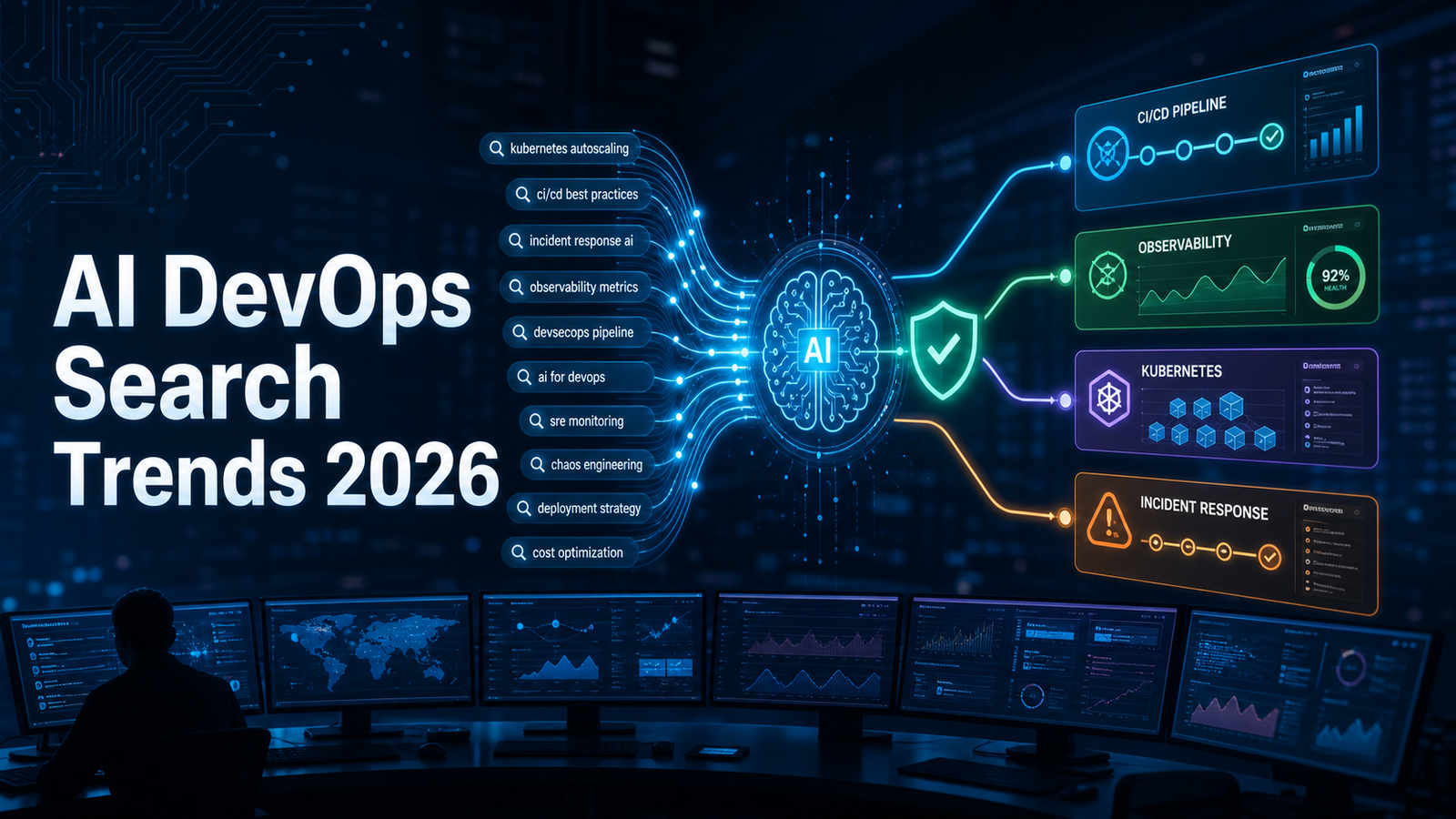

SEO excerpt: See what people are searching about AI and DevOps in 2026, including AIOps, AI CI/CD, DevSecOps, Kubernetes troubleshooting, tool selection, risks, and a practical safe automation plan.
Search interest around AI and DevOps has moved past the headline question of whether AI will replace engineers. The questions people now ask are more useful: how do I use AI in CI/CD without breaking production, which AI DevOps tools are worth evaluating, what is AIOps, can AI debug Kubernetes, and what skills should a beginner learn first?
The honest answer is that AI helps DevOps most when it works inside controlled engineering systems. It can draft pipelines, explain logs, summarize incidents, review infrastructure-as-code, triage security findings, and search internal runbooks. It becomes risky when teams let it make production changes without tests, peer review, policy checks, rollback paths, and clear ownership.
Quick Answer
AI DevOps in 2026 means using generative AI, machine learning, and agent-style tools to improve software delivery and operations. The most searched topics are AI in CI/CD, AIOps, AI DevSecOps, Kubernetes troubleshooting, AI agents for DevOps, platform engineering assistants, and DevOps career impact.
Start with read-only or review-based workflows: pipeline review, incident summaries, runbook search, Terraform plan review, and security finding explanations. Move toward automated remediation only after your team has reliable observability, mature CI/CD, policy-as-code, human approval, audit logs, and tested rollback procedures.
What People Are Really Searching For
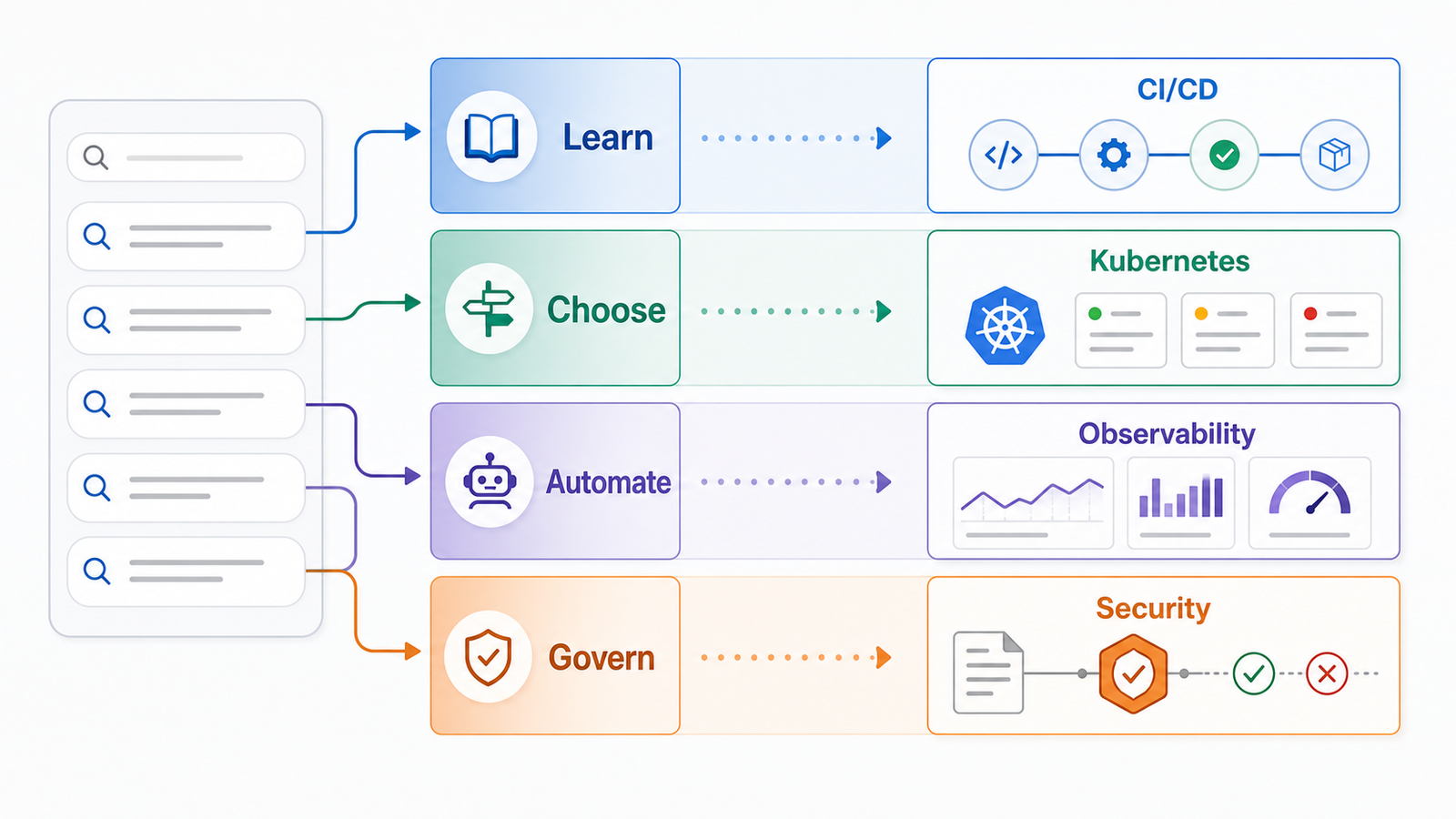
| Search intent | Example searches | What the searcher needs |
|---|---|---|
| Learn | what is AI in DevOps, what is AIOps, will AI replace DevOps | Plain explanations, career context, beginner roadmap |
| Choose | best AI DevOps tools, AIOps tools, AI CI/CD tools | Neutral comparisons, selection criteria, pricing caveats |
| Automate | AI for CI/CD, AI Kubernetes troubleshooting, AI incident response | Practical workflows, prompts, examples, guardrails |
| Govern | AI DevSecOps, AI security risks, policy for AI agents | Controls, approval models, audit trails, risk reduction |
This matters because one article cannot answer every intent well. A beginner wants definitions and learning order. A platform lead wants governance and tool fit. An SRE wants fewer noisy alerts and faster incident timelines. A DevSecOps engineer wants evidence, not a chatbot guessing at vulnerabilities.
Why AI and DevOps Are Converging
DevOps work is full of repetitive but context-heavy decisions. A failed deployment may involve a pull request, build logs, Kubernetes events, metrics, traces, feature flags, cloud limits, secrets, and recent incidents. AI is useful when it compresses that context into a better starting point: grouped alerts, risky workflow steps, possible pod failure causes, expensive infrastructure defaults, or a relevant runbook.
The best use is not replacing the engineer. It is shortening the path from noisy data to a reviewed action. For fundamentals, connect this topic with the GravityDevOps guide to generative AI: What Is Generative AI? A Beginner’s Guide. For delivery-tool context, compare CI/CD platforms here: Best CI/CD Tools 2026 Compared.
The Most Asked AI DevOps Questions in 2026
1. What is AI in DevOps?
AI in DevOps is the use of AI systems to assist planning, coding, testing, deployment, monitoring, incident response, infrastructure management, and security operations. It includes simple copilots, machine learning anomaly detection, retrieval over runbooks, and agentic tools that can open pull requests or execute approved workflows.
The key word is assist. In a healthy DevOps system, AI output still passes through version control, tests, scanning, review, and deployment controls.
2. What is AIOps?
AIOps means artificial intelligence for IT operations. It usually focuses on observability and incident response: alert correlation, anomaly detection, root-cause hints, topology awareness, incident summarization, and automated runbook recommendations.
AIOps works best after the basics are clean. If services have inconsistent names, missing owners, weak logging, noisy alerts, and no deployment markers, AI will produce confident but weak conclusions. Better telemetry comes before better AIOps.
3. Can AI create CI/CD pipelines?
Yes. AI can draft GitHub Actions, GitLab CI, Jenkins, CircleCI, or other pipeline configurations. The generated YAML may be a good starting point, especially for common stacks such as Node.js, Python, Java, Docker, and Kubernetes.
But generated CI/CD needs review. Check whether dependencies are cached correctly, third-party actions are pinned, secrets are never printed, test failures block deployment, container images are scanned, artifacts are named clearly, and production deployment requires approval.
Review this CI/CD workflow for reliability and security.
Focus on secrets, dependency caching, pinned actions, test gates,
artifact handling, deployment approvals, and rollback readiness.
Return only specific issues with suggested fixes.
4. Can AI debug Kubernetes?
AI can help explain Kubernetes errors, but it should not blindly run commands in production. Use it to interpret events, logs, resource limits, probes, image pull errors, DNS failures, and recent deployment changes.
kubectl get pods -n app
kubectl describe pod <pod-name> -n app
kubectl logs <pod-name> -n app --previous
kubectl get events -n app --sort-by=.lastTimestamp
kubectl rollout history deployment/<deployment-name> -n app
Summarize these Kubernetes events and logs.
Separate confirmed facts from hypotheses.
List the next three safe read-only checks.
Do not suggest write commands yet.5. Will AI replace DevOps engineers?
AI will reduce some repetitive work, but it does not replace DevOps ownership. Someone still has to design reliable delivery systems, understand cloud networking, control cost, secure credentials, manage incident response, tune alerts, review generated changes, and explain tradeoffs to the business.
The risky role is “YAML typist.” The valuable role is engineer who understands release safety, production behavior, security, automation boundaries, and developer experience.
Practical AI DevOps Use Cases
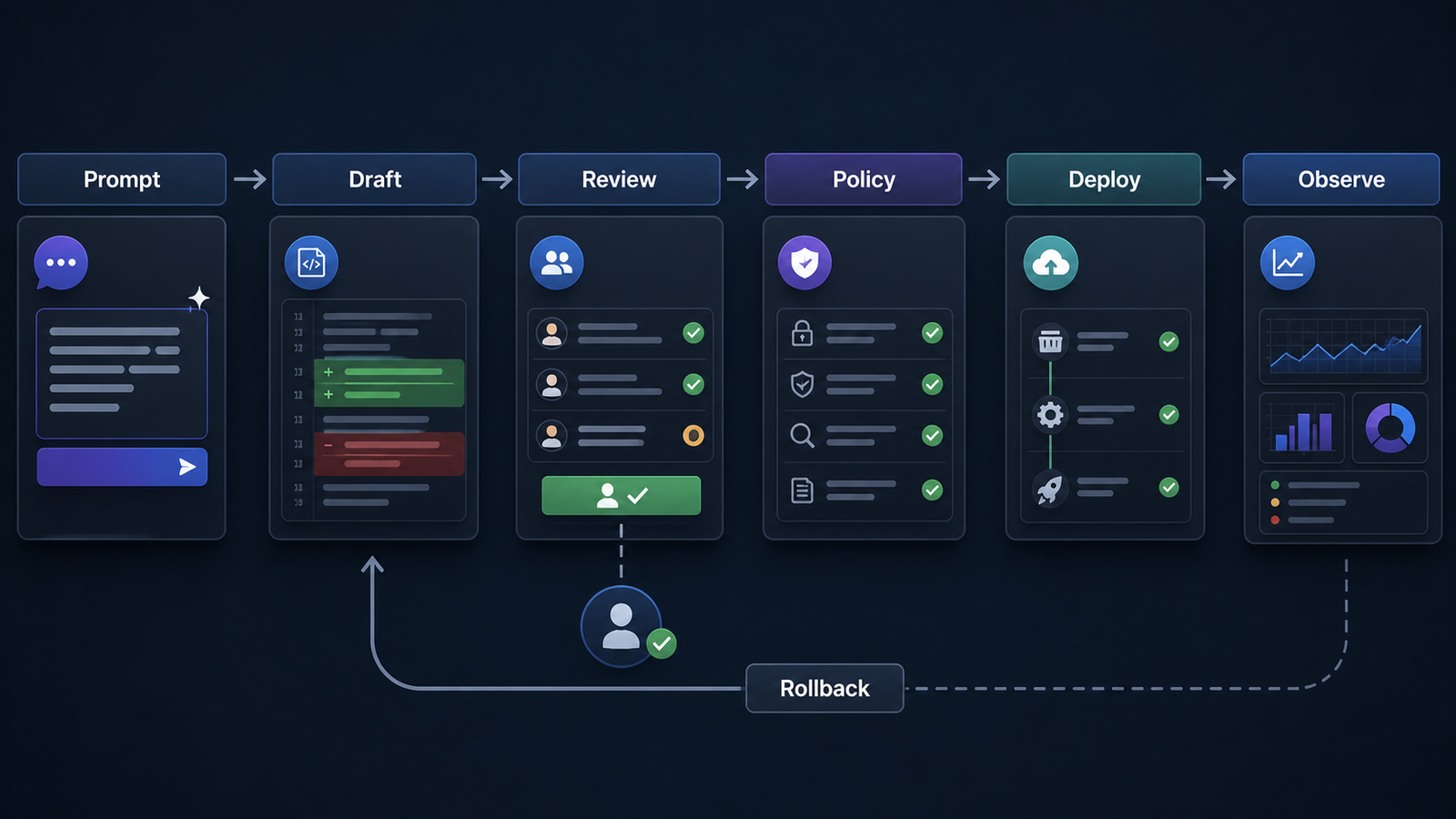
Use AI where the evidence already exists and the result can be reviewed: CI/CD pull request review, incident summaries, runbook search, infrastructure-as-code review, and DevSecOps triage. Ask it to find missing test gates, unsafe shell scripts, unpinned dependencies, suspicious Terraform changes, repeated alerts, or scanner findings that need clearer remediation steps.
The important rule is evidence. For incident work, a good AI summary labels facts, hypotheses, customer impact, decisions, and follow-up actions. For runbook search, the answer should cite the source document and show freshness. For security work, final gates should still rely on scanners, SBOMs, signing, provenance, and policy.
AI DevOps Tool Categories
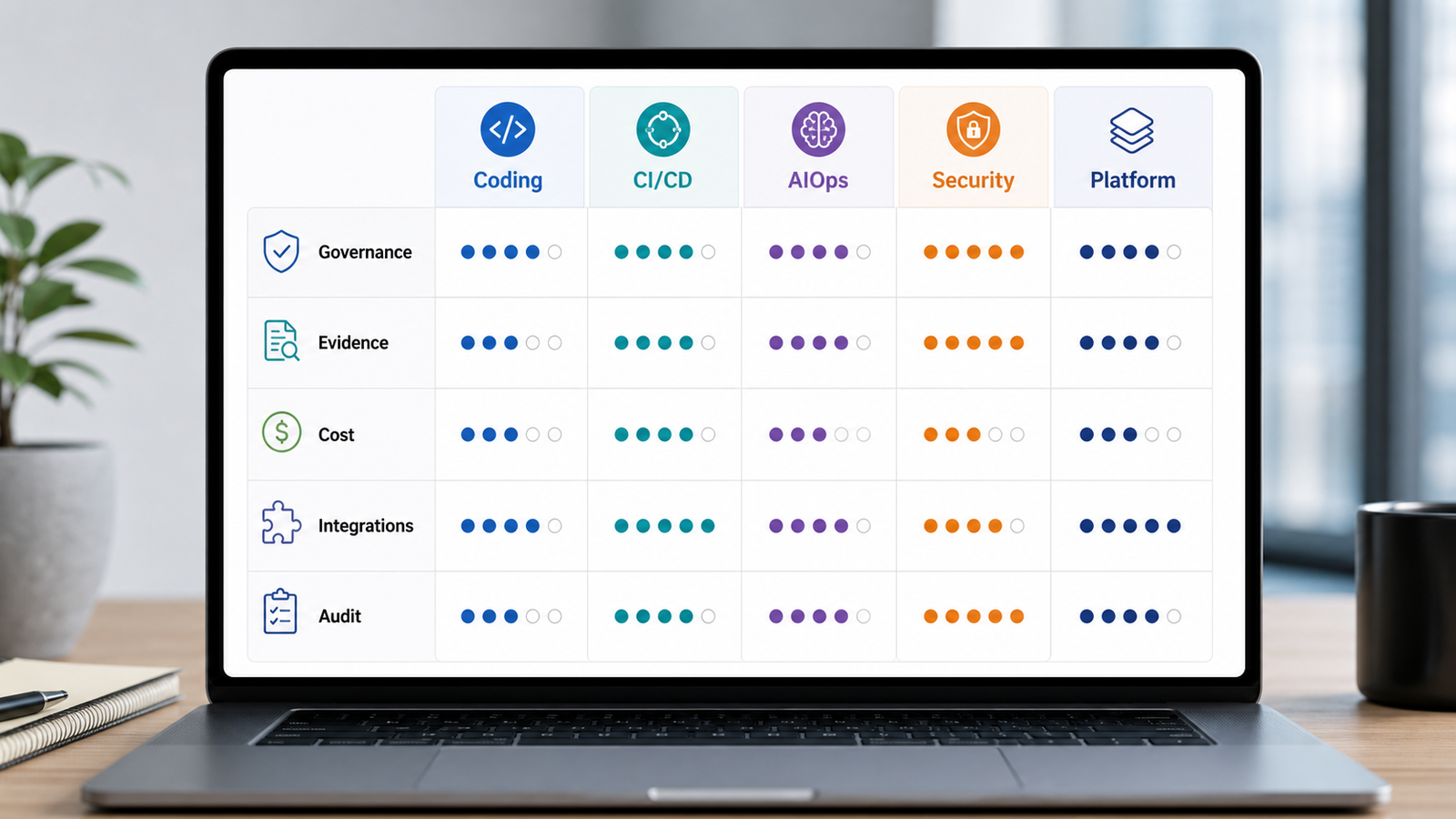
| Category | Useful for | Selection criteria | Pricing caveat |
|---|---|---|---|
| Coding assistants | Code, tests, pipeline drafts, documentation | Repository support, enterprise controls, data policy, PR workflow | Often priced per seat, sometimes with premium agent usage |
| CI/CD platforms with AI | Build diagnosis, test selection, release notes, workflow generation | Existing pipeline fit, audit trail, approval gates, secrets handling | AI features may be add-ons or higher-tier features |
| AIOps and observability | Alert grouping, anomaly detection, root-cause hints, incident summaries | Telemetry coverage, topology quality, explainability, on-call integration | Data ingest and high-cardinality telemetry can drive cost |
| DevSecOps platforms | Finding explanation, prioritization, policy help, compliance evidence | Scanner quality, policy support, SBOM/provenance, false-positive workflow | Advanced security and AI tiers may be separate |
| Platform engineering assistants | Self-service templates, service catalog help, internal docs search | Source freshness, access controls, template governance, approval flows | Usage may scale with indexed content, seats, or agent runs |
There is no single “best AI DevOps tool” for every team. If your largest pain is broken builds, look at CI/CD and code-review assistance. If your on-call team is drowning in alerts, evaluate observability and AIOps. If audits and software supply chain risk are the priority, start with DevSecOps tooling and policy.
A Safe Automation Plan
Step 1: Pick one narrow workflow
Do not start with “AI will manage production.” Start with one bounded workflow:
- review CI/CD pull requests,
- summarize incidents,
- answer runbook questions,
- review Terraform plans,
- explain security findings.
Step 2: Define allowed actions
| Action | First version |
|---|---|
| Read logs | Allowed for approved systems |
| Read code | Allowed for selected repositories |
| Comment on pull requests | Allowed |
| Open pull requests | Allowed after review |
| Run production write commands | Not allowed |
| Trigger remediation | Manual approval required |
Step 3: Keep humans in the loop
For production-impacting work, require human approval. AI can propose a fix, create a draft pull request, or prepare a runbook command. A responsible engineer reviews the evidence and decides.
Step 4: Measure usefulness and expand carefully
Track whether AI actually improves work: review time saved, useful comments per pull request, false positives, incident summary accuracy, security findings prioritized correctly, failed deployments prevented, and engineer trust after real use.
If CI/CD review works, add test suggestions. If incident summaries work, add postmortem drafts. If runbook search works, add approved diagnostic commands. Expand by adjacency, not by hype.
Common Mistakes
The first mistake is adding AI before fixing the basics. If tests are flaky, secrets are unmanaged, and alerts are noisy, AI will amplify the mess. The second mistake is giving AI tools too much access too early. Read-only access plus pull request comments is a reasonable start. Production write access is not.
The third mistake is ignoring cost. AI features may charge by seat, token usage, agent run, telemetry volume, indexed repository, or premium security tier. The fourth mistake is accepting answers without evidence. For operational work, ask for source logs, metric names, trace IDs, commit SHAs, runbook links, policy IDs, or scanner evidence.
Beginner Learning Path
If you want to learn AI DevOps, learn DevOps first:
- Linux, networking, and shell basics.
- Git, pull requests, and code review.
- CI/CD concepts and one real pipeline.
- Docker and container image basics.
- Kubernetes fundamentals.
- Cloud IAM, networking, and cost basics.
- Infrastructure as code with Terraform, OpenTofu, or Pulumi.
- Monitoring with logs, metrics, traces, and alerts.
- Security scanning, secrets management, SBOMs, and policy.
- AI prompting, AI code review, runbook search, and governance.
Build one small project: a simple API, automated tests, a container image, a CI pipeline, a security scan, a test deployment, and a dashboard. Then use AI to review each layer.
Internal Links for GravityDevOps Readers
- Generative AI foundation: What Is Generative AI? A Beginner’s Guide
- CI/CD buying context: Best CI/CD Tools 2026 Compared
- AI DevOps roadmap: AI DevOps Roadmap 2026
- AI-powered CI/CD: AI-Powered CI/CD Pipelines in 2026
- AI agent observability: AI Agent Observability for DevOps
FAQ
What is the most searched AI DevOps topic in 2026?
The strongest clusters are AI in CI/CD, AIOps, AI DevSecOps, Kubernetes troubleshooting, AI agents for DevOps work, and whether AI will replace DevOps engineers. The practical intent is shifting from curiosity to tool choice and safe implementation.
What is the best first AI DevOps use case?
The best first use case is usually read-only or review-based: CI/CD pull request review, incident summary drafts, runbook search, Terraform plan review, or security finding explanation. These create value without giving AI direct production control.
Is AIOps the same as DevOps?
No. DevOps is a broader engineering culture and practice for delivering reliable software. AIOps is a technology category that applies AI and machine learning to operations data such as alerts, logs, metrics, traces, incidents, and service topology.
Can AI safely fix production incidents?
AI can help summarize evidence and recommend next checks, but automated production remediation should be introduced carefully. Require observability, tested runbooks, permissions boundaries, audit logs, human approval, and rollback paths before allowing write actions.
Which AI DevOps tools should I evaluate?
Evaluate tools based on your main pain: coding assistants for code and pipeline drafts, CI/CD platforms for build diagnosis, AIOps tools for alert correlation, DevSecOps platforms for security triage, and platform assistants for internal developer self-service.
What skills do DevOps engineers need for AI?
DevOps engineers need stronger fundamentals, not weaker ones: Linux, CI/CD, Kubernetes, cloud, infrastructure as code, observability, security, incident response, and cost control. Add AI-specific skills such as prompt design, output validation, retrieval quality, governance, and agent access control.
Schema-Ready FAQ Structure
{
  "@context": "https://schema.org",
  "@type": "FAQPage",
  "mainEntity": [
    {
      "@type": "Question",
      "name": "What is the most searched AI DevOps topic in 2026?",
      "acceptedAnswer": {
        "@type": "Answer",
        "text": "The strongest clusters are AI in CI/CD, AIOps, AI DevSecOps, Kubernetes troubleshooting, AI agents for DevOps work, and whether AI will replace DevOps engineers. The practical intent is shifting from curiosity to tool choice and safe implementation."
      }
    },
    {
      "@type": "Question",
      "name": "What is the best first AI DevOps use case?",
      "acceptedAnswer": {
        "@type": "Answer",
        "text": "The best first use case is usually read-only or review-based: CI/CD pull request review, incident summary drafts, runbook search, Terraform plan review, or security finding explanation. These create value without giving AI direct production control."
      }
    },
    {
      "@type": "Question",
      "name": "Is AIOps the same as DevOps?",
      "acceptedAnswer": {
        "@type": "Answer",
        "text": "No. DevOps is a broader engineering culture and practice for delivering reliable software. AIOps is a technology category that applies AI and machine learning to operations data such as alerts, logs, metrics, traces, incidents, and service topology."
      }
    },
    {
      "@type": "Question",
      "name": "Can AI safely fix production incidents?",
      "acceptedAnswer": {
        "@type": "Answer",
        "text": "AI can help summarize evidence and recommend next checks, but automated production remediation should be introduced carefully. Require observability, tested runbooks, permissions boundaries, audit logs, human approval, and rollback paths before allowing write actions."
      }
    },
    {
      "@type": "Question",
      "name": "Which AI DevOps tools should I evaluate?",
      "acceptedAnswer": {
        "@type": "Answer",
        "text": "Evaluate tools based on your main pain: coding assistants for code and pipeline drafts, CI/CD platforms for build diagnosis, AIOps tools for alert correlation, DevSecOps platforms for security triage, and platform assistants for internal developer self-service."
      }
    },
    {
      "@type": "Question",
      "name": "What skills do DevOps engineers need for AI?",
      "acceptedAnswer": {
        "@type": "Answer",
        "text": "DevOps engineers need stronger fundamentals, not weaker ones: Linux, CI/CD, Kubernetes, cloud, infrastructure as code, observability, security, incident response, and cost control. Add AI-specific skills such as prompt design, output validation, retrieval quality, governance, and agent access control."
      }
    }
  ]
}

