


Choose Cursor when you want a focused AI coding environment built around one primary agent, fast editor interaction and a growing set of cloud workflows. Choose Windsurf—now called Devin Desktop—when you want the editor to act as a command center for coordinating local, cloud and third-party agents. Both can edit repositories and run developer tools, but their product direction is now meaningfully different.
The naming matters. Cognition renamed Windsurf to Devin Desktop on June 2, 2026, and replaced Cascade as its primary local agent with Devin Local. Existing Windsurf settings, extensions and plans carried forward, so developers still searching for “Cursor vs Windsurf” are comparing Cursor with today’s Devin Desktop. This guide uses current US-facing official information as of October 21, 2026. It does not claim hands-on testing, benchmark wins or guaranteed productivity gains.
Cursor vs Windsurf at a glance
| Decision factor | Cursor | Windsurf / Devin Desktop |
|---|---|---|
| Best fit | Developers who want an AI-native editor with a strong first-party coding agent | Developers and teams coordinating multiple local and cloud agents from one desktop |
| Primary experience | Editor-centered coding agent, CLI, cloud agents, reviews and connected workflows | Agent Command Center plus a full IDE, Devin Local, optional Devin Cloud and ACP agents |
| Local work | Agent reads, edits and runs tools in the developer workspace with configurable modes and controls | Devin Local operates against the local workspace; the IDE retains the former Windsurf editing experience |
| Cloud work | Cursor cloud agents can work asynchronously against connected repositories | Devin Cloud is a separate long-running agent surface that can be coordinated from Desktop |
| Rules | .cursor/rules and AGENTS.md | .devin/rules, AGENTS.md, legacy Windsurf rules and import from Cursor rules |
| Free access | Free tier with limited AI usage | Free desktop plan; paid usage expands agent capacity |
| Main strength | Cohesive first-party editor and agent workflow | Multi-agent coordination, ACP interoperability and continuity for Windsurf users |
| Main tradeoff | Paid usage, cloud delegation and third-party models add cost and governance decisions | The 2026 rename and agent transition create migration, policy and terminology work |
This is a direct editor-workflow comparison, not a broad market ranking. Start with the AI coding tools pillar for the full landscape. For a choice between an AI-native editor and a platform assistant, see Cursor vs GitHub Copilot.
What happened to Windsurf?
Cognition’s official June 2026 announcement says Windsurf is now Devin Desktop. The product remains a full IDE, but its default surface emphasizes an Agent Command Center with Spaces, a Kanban-style view and management for local and cloud agents. It also supports compatible third-party agents through the Agent Client Protocol.
The underlying comparison is therefore still useful, but the old “Cursor versus Cascade inside Windsurf” framing is obsolete. Devin Local succeeded Cascade as the primary local agent. Cognition’s migration FAQ says existing editor settings, extensions, workflows and plans carried forward. It also documents continued support for legacy Windsurf rule paths while preferring new .devin/ paths.
For buyers, that changes the question. Cursor remains centered on its own coding environment and agent platform. Devin Desktop is positioning the IDE as a place to supervise a fleet that may include Devin Local, Devin Cloud, Codex, Claude Agent, OpenCode or an internal ACP-compatible agent. Teams should evaluate the current products, not screenshots or reviews written before the rename.
How we compared Cursor and Devin Desktop
We compared the products by the boundary around real development work:
- Workflow: whether work begins in an editor, a local agent, a cloud queue or an external issue.
- Context: how repositories, rules, files, terminals and connected tools enter the request.
- Authority: which files, commands, networks, credentials and external services an agent can reach.
- Verification: how developers inspect diffs, run tests, review dependencies and recover from a bad change.
- Commercial model: free access, subscriptions, included usage, overage and team billing.
- Governance: training terms, retention, identity, administrative controls, auditability and deployment choices.
We did not score model intelligence. Both products change models, routing and agent harnesses frequently, and generic coding benchmarks do not reproduce your repository structure, test quality, dependency graph or security controls. A bounded pilot on representative work is more defensible.
The biggest difference is agent orchestration
Cursor favors a cohesive first-party workflow
Cursor’s current documentation describes a coding agent that can understand a repository, plan work, modify multiple files, run commands and review changes. The editor remains the center of gravity: ask a question, generate a plan, apply a change, inspect the diff and iterate without changing tools. Cursor also extends that model through a CLI, cloud agents, code review, integrations and automation.
This cohesion is attractive for individual developers and teams that want one default operating model. A developer can begin with read-oriented exploration, move into agent edits and keep review close to the working tree. Cloud agents support asynchronous delegation, but they should be treated as a different execution environment with separate repository access, network reach and cost.
Devin Desktop makes coordination the primary surface
Devin Desktop retains the VS Code-derived IDE experience familiar to Windsurf users, including extensions, keybindings, language servers and editing tools. The newer product direction places an agent manager in front: developers can organize work into Spaces, monitor multiple sessions and review changes from local, cloud or ACP-connected agents.
That is useful when a team already runs several agent types or wants to divide work into parallel streams. It also increases the governance surface. Each agent can have different credentials, execution location, tool permissions, retention terms and failure modes. A shared board makes work visible; it does not make the underlying agents equivalent.
Devin Local is not the same thing as Devin Cloud
The Devin Local documentation distinguishes the local agent in Desktop from Devin Cloud. Local work benefits from the developer machine’s tools and fast feedback, but it also inherits the risks of that machine’s credentials and network access. Devin Cloud is designed for autonomous, longer-running work on a separate machine and remains a separate product path for many accounts.
Cursor has a similar local-versus-cloud distinction. Do not compare “Cursor” and “Devin” as single execution modes. Compare the exact routes your team will approve: local editor agent, local CLI, remote agent, pull-request review and any connected MCP or ACP tools.
Context, rules and execution controls
Both products use versioned repository instructions
Cursor supports project rules under .cursor/rules and the simpler AGENTS.md convention. Rules can encode architecture constraints, test commands and scoped conventions. Devin Desktop prefers .devin/rules, also reads AGENTS.md, retains legacy .windsurfrules and .windsurf/rules, and can import Cursor rule files. That migration flexibility is valuable for teams testing both.
Rules are instructions, not enforcement. An agent can misunderstand a rule, retrieve conflicting documentation or encounter prompt injection in issues, web pages and tool output. Put mandatory controls in build systems, branch protection, static analysis and permissions—not only in prose supplied to the model.
Context should be relevant, not merely large
Both environments can search repositories and assemble context around a task. Exact model windows and routing can change by plan and model, so avoid buying on a single context-number claim. Instead, test whether the tool reliably finds the right module, honors generated-code exclusions, traces interfaces across packages and preserves constraints after a long session.
Keep secrets, customer exports, production state and unrelated repositories out of reachable context. Use ignore files where supported, but validate them with a canary repository and network logging. An ignore rule may reduce indexing without preventing every explicit tool or shell command from opening the same file.
Local agents can still send context to hosted services
“Local” describes where tools run; it does not necessarily mean offline inference. Cursor’s published privacy documentation says requests are routed through its backend for prompt construction. Devin Desktop can use Cognition and third-party model infrastructure. Teams should map each request from local file access through the service backend and model provider, then verify retention and training terms for the actual account and selected model.
Cursor vs Windsurf pricing and access
Pricing and usage accounting change quickly. Confirm the linked official pages before purchase.
As of October 21, 2026, Cursor’s pricing page lists a limited free tier and paid individual tiers with progressively larger usage pools. The current structure also separates included first-party usage from some third-party model charges and offers team and enterprise controls at higher tiers. Cursor’s pricing has changed substantially over time, so a 2025 comparison may describe plans that no longer exist.
Devin Desktop’s current product page lists Free at $0, Pro at $20 per month and Max at $200 per month. It lists Teams as an $80 monthly base plus $40 per full seat, while Enterprise is custom. Existing legacy Windsurf customers may retain different plan mechanics, and Devin Cloud can introduce separate consumption and purchasing decisions.
Do not compare only the cheapest seat. Measure usable agent work, model or credit overage, cloud execution, CI minutes, failed runs, human review time, security administration and migration cost. Cursor may be simpler for a team standardizing on one first-party workflow. Devin Desktop may provide more value when one interface genuinely replaces several agent consoles. Paying for overlapping agents without assigned roles usually adds cost rather than leverage.
Privacy, security and team controls
Cursor privacy depends on mode and surface
Cursor says Privacy Mode prevents Cursor and its model providers from using code data for training. Its public documentation also says repository indexing sends code chunks to compute embeddings while plaintext code is discarded after the request, with embeddings and selected metadata retained. Cloud agents require repository access and execute away from the local workstation, so evaluate their data path separately from an interactive editor session.
Teams should enable the intended privacy mode centrally where available, verify which models and integrations are permitted, set spending limits and inspect audit controls. Treat background agents, external MCP servers and repository apps as privileged integrations rather than ordinary autocomplete.
Cognition publishes enterprise processing commitments
Cognition’s July 2026 data-processing agreement says enterprise customer data is processed to provide the service, is subject to model-training restrictions in the governing agreement, and is protected through contractual restrictions on subprocessors. It lists cloud and model providers that may process inputs depending on enabled features. Consumer and legacy Windsurf terms can differ, so confirm the contract attached to the plan you will actually buy.
The Devin Desktop transition also affects endpoint controls. The official FAQ documents new application names, file paths and preferred .devin/ directories while retaining legacy Windsurf paths. Enterprise teams should update device-management allowlists, DLP rules, network policy and file-integrity monitoring rather than assuming a branding change is operationally invisible.
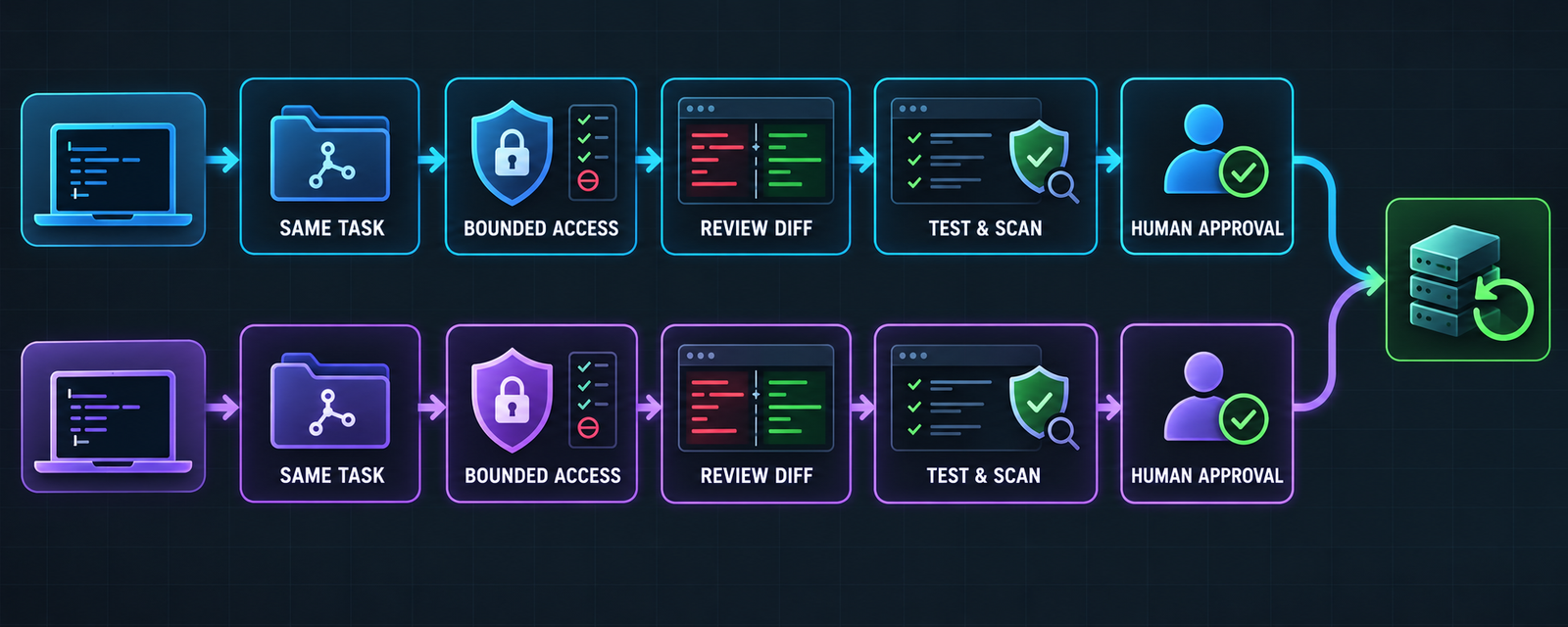
Minimum controls for either environment
- Grant only the repositories, directories, commands, network hosts and connected tools required for the task.
- Keep production secrets out of workspaces; use short-lived, narrowly scoped credentials for approved development services.
- Begin with a plan or read-only pass, then approve a bounded edit scope.
- Inspect the complete diff, lockfiles, migrations, infrastructure changes and external actions.
- Run compilation, tests, secret scanning, dependency review and static analysis outside the model’s own judgment.
- Merge through branch protection and human ownership; preserve commits, checkpoints and a tested rollback path.
These controls matter across the broader category covered in the AI code editor vs traditional IDE comparison. They also complement the platform-focused safeguards in the AI coding tools for VS Code guide.
A safe equal-task pilot
- Select representative repositories. Use one routine service and one realistic monorepo or legacy application without production credentials.
- Define the same task set. Include a bounded bug fix, test addition, refactor and dependency update with written acceptance criteria.
- Normalize authority. Give both environments equivalent repository scope, network access, command permissions and model class.
- Start with a plan. Require each agent to identify affected files, risks and validation commands before editing.
- Capture real cost. Record subscriptions, credits, cloud execution, CI usage, failed attempts and human review time.
- Verify independently. Run canonical builds, tests and security checks; inspect every dependency and generated artifact.
- Measure outcomes. Compare task completion, escaped defects, rework, review burden and security findings—not generated lines.
- Roll out gradually. Approve agents and tools by repository class, document exceptions and keep revocation and rollback ready.
Which should you choose?
- Choose Cursor when you want a cohesive AI editor with a strong first-party agent and straightforward individual adoption.
- Choose Devin Desktop when managing multiple local and cloud agents from one command center is a real workflow need.
- Stay with Devin Desktop after Windsurf when migration continuity, existing extensions and legacy rules outweigh the benefit of switching editors.
- Prefer Cursor when your pilot shows that one focused agent produces less coordination overhead than a multi-agent surface.
- Use both only with explicit roles. Define which environment owns completion, edits, cloud delegation and review to avoid conflicting changes and duplicated spend.
- Choose neither yet if the team cannot constrain tool access, keep secrets out of context, run reliable tests or review generated diffs.
If cost is the main constraint, compare the enduring limits and hidden infrastructure costs in the free AI coding tools guide.
Frequently asked questions
Is Windsurf still available in 2026?
Windsurf was renamed Devin Desktop on June 2, 2026. Existing users received the change through an update, and the core IDE experience, extensions and legacy settings carried forward. The Windsurf name remains in some paths, enterprise accounts and JetBrains plugin references.
Is Devin Desktop better than Cursor?
Devin Desktop is a better fit when multi-agent coordination and continuity from Windsurf matter. Cursor is often a better fit when developers want one cohesive editor-agent workflow. A controlled pilot on the same repositories is more reliable than a universal ranking.
Did Devin Local replace Cascade?
Yes. Cognition describes Devin Local as the successor to Cascade and the primary local agent in Devin Desktop. Legacy Windsurf rules remain supported, but new rules should use the preferred Devin paths.
Can Devin Desktop use Cursor rules?
Its official FAQ says Devin Desktop can import .cursor/rules into .devin/rules. Teams should review imported instructions because syntax, activation rules and tool behavior may not be identical.
Do Cursor and Devin Desktop run entirely locally?
No. Both can run development tools against a local workspace, but model requests may pass through vendor and model-provider infrastructure. Cloud agents run in remote environments. Map the actual data path for each approved mode.
Which is safer for private repositories?
Safety depends on plan terms, enabled privacy controls and agent authority. Neither eliminates prompt injection, secret exposure, dependency risk or unsafe commands. Enforce least privilege, independent CI, protected branches, human review and rollback.
Bottom line
Cursor versus Windsurf is now Cursor versus Devin Desktop. Cursor offers a tightly integrated editor and agent platform. Devin Desktop turns the former Windsurf IDE into a command center for local, cloud and third-party agents. Choose the operating model that reduces total coordination and review burden under your security constraints, then verify it with equal tasks and equal permissions.

