


GitHub Copilot is the best AI coding tool for most VS Code users because it has the deepest editor integration and the lowest setup friction. Continue is the better choice when model and provider control matter; Cline is strong for visible, approval-driven agent work; Tabnine fits teams that prioritize deployment and data controls; Gemini Code Assist still serves managed Google Cloud customers; and Amazon Q Developer is now a transition choice because AWS plans to end IDE-plugin support on April 30, 2027.
Do not choose by model name alone. In VS Code, the important differences are which files can become context, whether the assistant merely suggests code or can edit and run commands, how approvals and sandboxing work, where code is processed, what the account and usage model costs, and whether administrators can enforce policy. This guide compares those operating boundaries using current official documentation as of October 18, 2026. It does not claim independent benchmark or hands-on accuracy results.
Best AI coding tools for VS Code at a glance
| Tool | Access model | Best fit | Important limitation |
|---|---|---|---|
| GitHub Copilot | Free limited plan; paid individual and organization plans; GitHub or Microsoft sign-in | Most VS Code users and GitHub-centered teams | Features, models, quotas and policies vary by plan and surface |
| Continue | Open-source client; configure a model provider or local model | Provider choice, local models and customizable agents | Cost, quality and data flow depend on the selected stack |
| Cline | Free open-source client; pay-as-used inference or local models; enterprise controls sold separately | Transparent, approval-driven agent tasks | Long agent loops can consume substantial tokens and execute powerful tools |
| Tabnine | Hosted paid plans; enterprise SaaS, VPC, on-premises and air-gapped options | Organizations with strict privacy or deployment requirements | Advanced governance and private deployment are enterprise concerns |
| Gemini Code Assist | Standard and Enterprise through Google Cloud | Managed Google Cloud development teams | Individual IDE tiers stopped serving requests in June 2026 |
| Amazon Q Developer | Free tier with Builder ID; Pro through Builder ID or IAM Identity Center | Existing AWS users during a migration period | AWS will discontinue IDE-plugin support on April 30, 2027 |
Plans and quotas change frequently. Confirm the linked vendor pages before buying or standardizing. If you are comparing whole development environments rather than extensions inside VS Code, read the AI code editor versus traditional IDE guide. For the broader market, modes and terminology, start with the AI coding tools pillar.
How we compared VS Code AI assistants
A useful comparison must separate completion, chat, editing and agent execution. Completion predicts code near the cursor. Chat explains or proposes. Edit mode applies bounded changes. An agent can search files, change several files, run terminal commands, call tools and sometimes use the network. Those are different authority levels, even when they share a model.
We assessed each option against six practical questions:
- Editor fit: Does it use VS Code diagnostics, diffs, tests, source control and workspace context cleanly?
- Context control: Can the developer see or constrain files, repositories, indexes, rules and retrieved content?
- Action boundary: Does the product only suggest, or can it write files, run a terminal, browse, install dependencies or call MCP tools?
- Access and cost: Is there a durable free tier, a trial, a per-seat subscription, metered inference, local hardware cost or a combination?
- Data and enterprise controls: What is documented about retention, training, indexing, deployment, policy, identity and audit?
- Lifecycle: Is the extension actively supported, and is there a migration or deprecation deadline?
No assistant gets credit merely for accepting a large context window. Repository access can improve relevance, but it also expands exposure and prompt-injection risk. The better tool is the one that can solve representative work inside an authority boundary your team understands.
Six AI extensions and assistants for VS Code
1. GitHub Copilot: best overall for VS Code
Copilot is the default recommendation for developers who want inline suggestions, chat, edits and agents without rebuilding their editor workflow. GitHub’s IDE documentation describes VS Code support for completion, planning, agent mode, parallel sessions, cloud agents, model choice, bring-your-own-key options and remote or containerized environments.
The current Copilot plan matrix lists a limited Free plan—currently including 2,000 completions per month—alongside paid individual and organization tiers. Models, premium-request accounting, agents, policy and audit features are not identical across plans, so teams should compare the exact surface they intend to use rather than assuming every Copilot feature inherits the same control.
Content exclusion is useful but not a universal secret filter. GitHub states that exclusion is available to Business and Enterprise administrators and that it is not currently supported in VS Code Edit and Agent modes. It can also receive semantic information indirectly through the IDE. Keep credentials out of the workspace and test policy against the actual mode.
Choose Copilot when: VS Code and GitHub are already standard. Watch for: granting broad agent autonomy because basic completion felt low-risk.
2. Continue: best for model and provider flexibility
Continue provides open-source VS Code and JetBrains extensions with autocomplete, chat, edit, plan and agent modes. Its official overview positions the client as a way to build and share custom AI code agents rather than a single bundled model subscription.
The separation is important for cost and privacy: the client can be free while hosted inference, API keys, local GPUs and operational maintenance are not. The selected provider determines model availability, retention and billing. Continue’s agent documentation says Plan mode is read-only, Agent mode can modify code and run tools, and tool calls ask permission by default unless policy marks them automatic.
Choose Continue when: you need local inference, provider portability or team-defined configurations. Watch for: leaking provider keys through repository config and treating a configurable stack as automatically private.
3. Cline: best for visible, approval-driven agent work
Cline is an open-source VS Code agent that can read and edit files, run commands, use a browser and connect to MCP tools. Its workflow exposes proposed actions and supports checkpoints. Cline’s official extension page describes approval for file changes and terminal commands, diff review, token and cost tracking, and provider or local-model selection.
Cline’s current pricing page says the individual client is free and inference is paid at usage cost or supplied through your own keys; enterprise capabilities such as SSO, role-based access, centralized policy, audit logs and private deployments are separate. That is a real free client, not unlimited free model usage. Agent loops repeatedly send context and tool results, so cost can rise with repository size and task length.
Choose Cline when: you want to observe and approve an agent’s steps and switch providers. Watch for: auto-approval, untrusted MCP servers, package install scripts and deployment commands.
4. Tabnine: best for controlled enterprise deployment
Tabnine emphasizes private processing and deployment choice. Its supported-IDE documentation lists VS Code on Windows, macOS and Linux. The privacy documentation says code context is processed ephemerally, is not retained or used for training, and is not shared with third-party model APIs when using Tabnine models.
For organizations with stronger infrastructure boundaries, Tabnine documents secure SaaS plus enterprise VPC, on-premises and fully air-gapped deployments. Those choices solve a different problem from a free completion extension: they add infrastructure, administration and contract work, so evaluate total cost and the exact telemetry path for the chosen deployment.
Choose Tabnine when: deployment location, retention and administrative control outweigh maximum model variety. Watch for: assuming “self-hosted” means zero outbound operational telemetry without checking configuration and terms.
5. Gemini Code Assist: best only for managed Google Cloud teams
Gemini Code Assist remains available in VS Code for Standard and Enterprise customers managed through Google Cloud. The official overview documents the IDE extension and, crucially, says the individual, Google AI Pro and Google AI Ultra IDE tiers stopped serving requests on June 18, 2026. Individual users are directed toward Google’s Antigravity platform instead.
Google’s quota documentation lists separate limits for code requests, chat and agent mode, and notes that one agent prompt can consume multiple model requests. Enterprise buyers should also verify code customization, project setup, supported regions, data governance and whether the current VS Code extension matches their intended lifecycle.
Choose Gemini Code Assist when: your organization already licenses Standard or Enterprise and uses Google Cloud controls. Watch for: outdated articles that still describe the discontinued individual VS Code offer as a free tier.
6. Amazon Q Developer: a migration choice, not a new long-term default
Amazon Q Developer still provides VS Code chat, completion, agentic coding, code review and AWS-oriented assistance. It can be used free with an AWS Builder ID, while Pro uses a paid Builder ID or workforce identity through IAM Identity Center. The setup documentation currently lists VS Code 1.85 or later.
However, AWS now states in its Amazon Q Developer guide that IDE-plugin support ends on April 30, 2027 and recommends Kiro for similar agent, chat and MCP capabilities. Existing AWS teams may use Q while planning migration, but a new multi-year VS Code standard should account for that deadline now.
Choose Amazon Q when: you already depend on its AWS workflows and have a dated migration plan. Watch for: expanding deployment shortly before the announced end of IDE-plugin support.
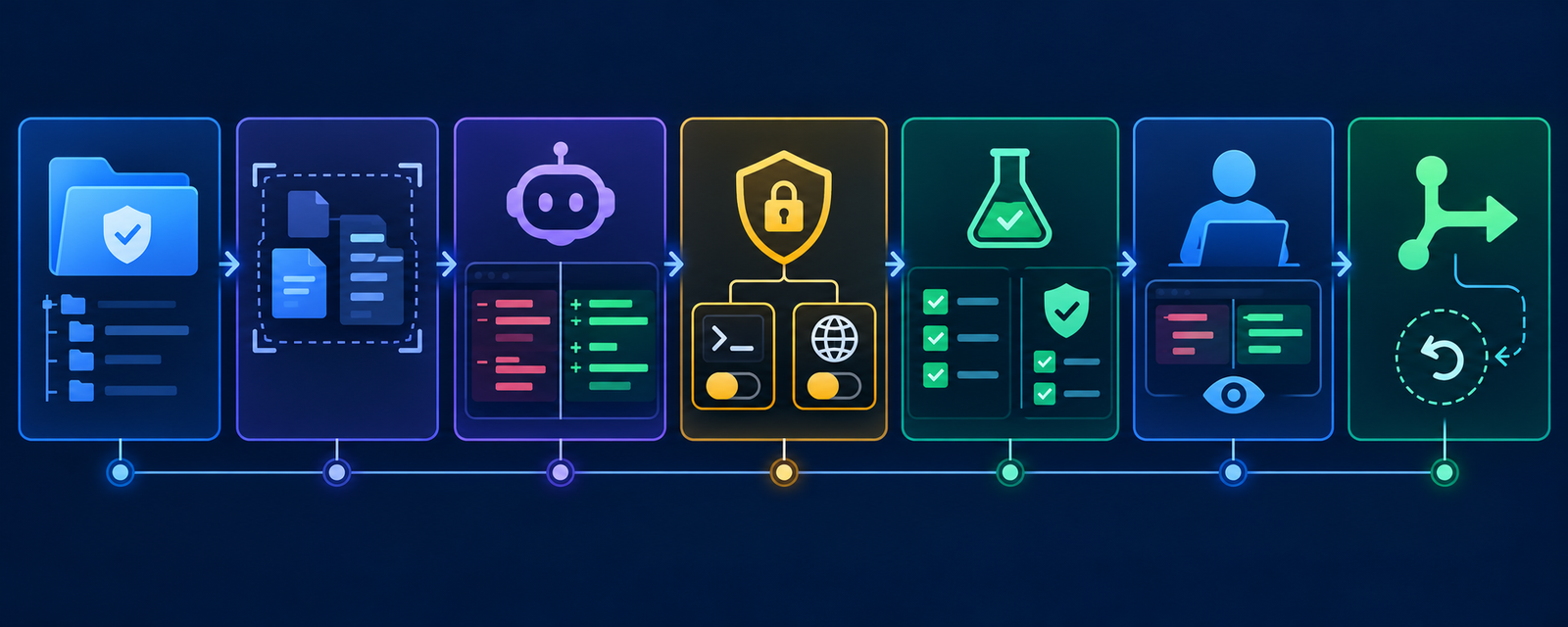
VS Code security and governance matter more than extension count
Installing several assistants does not create a better stack. Each extension may observe editor state, send context to a different service, store a separate credential, contribute tools or create its own index. Standardize one primary assistant and add another only for a distinct, documented need.
Microsoft’s VS Code AI security guidance recommends restricted mode for untrusted projects, sandboxing with network controls where supported, selective tool access, temporary session permissions, isolated worktrees, secure secret storage and review before integration. It also warns that extensions and MCP servers can have broad machine access. Workspace Trust reduces risk but cannot make a malicious trusted extension safe.
Treat repository files, issue text, fetched web pages, terminal output and MCP results as untrusted data. Prompt injection can turn retrieved instructions into tool requests. Protect secrets outside the workspace, apply least privilege, require approval for terminal and network actions, verify dependencies, review the complete diff and retain CI, code review, staged release and rollback. The AI agent security guide covers those controls in depth.
A safe way to evaluate a VS Code AI tool
- Inventory the data path. Record the extension publisher, model provider, account, repositories, indexing, retention, training setting and telemetry.
- Start with one extension. Disable overlapping assistants so you can attribute behavior, traffic, latency and cost.
- Use a disposable branch or worktree. Keep production credentials and deployment access out of the editor session.
- Begin read-only. Ask the tool to explain a failing test and propose a plan before allowing edits or commands.
- Test representative tasks. Use a bounded bug fix, multi-file refactor, dependency update and test addition—not a toy completion.
- Require explicit approvals. Review installs, scripts, network access, MCP calls, migrations, Git operations and cloud commands individually.
- Verify independently. Run formatters, compiler or type checks, linters, unit and integration tests, security scans and the production build.
- Measure outcomes. Track review time, CI failures, reverted suggestions, security findings, usage cost and developer satisfaction. Do not infer productivity from accepted lines of code.
- Document rollback and removal. Know how to revoke tokens, delete indexes, remove extensions and restore files before the pilot expands.
Language-specific verification still matters. A Python repository needs the correct interpreter, environment and test runner; JavaScript and TypeScript need runtime, module, workspace and build boundaries. See the Python AI coding tools guide and the JavaScript and TypeScript guide for those checks.
Which VS Code AI coding tool should you choose?
- Choose GitHub Copilot for the simplest integrated default, especially with GitHub repositories and organization policy.
- Choose Continue when provider portability, local models or shared custom configurations matter most.
- Choose Cline for visible agent steps, model choice and approval-centered multi-file work.
- Choose Tabnine when private deployment and enterprise data controls are primary buying criteria.
- Choose Gemini Code Assist only when Standard or Enterprise is already part of the Google Cloud operating model.
- Keep Amazon Q temporarily if it serves an existing AWS workflow, but plan for the April 2027 IDE-plugin deadline.
For individual developers who mainly need low-cost access, compare the durable tiers and local clients in the free AI coding tools guide. “Free extension” and “free inference” are not the same thing.
Frequently asked questions
What is the best free AI extension for VS Code?
Copilot Free is the lowest-friction limited option. Continue and Cline provide free open-source clients, but hosted model inference may still cost money; local models shift the cost to hardware and maintenance. Compare real limits and data flow, not the word “free.”
Can I install several AI coding assistants at once?
You can, but overlapping completion, indexing, telemetry and tool permissions make governance and troubleshooting harder. Use one primary assistant. Add a second only for a distinct workflow, then document which extension is enabled for each repository class.
Are VS Code AI extensions safe for private code?
Not automatically. Safety depends on the publisher, model provider, settings, plan, indexing, retention, training choices, extension permissions and agent tools. Keep secrets outside the workspace and validate the exact configuration with security and legal teams.
Does Workspace Trust sandbox AI extensions?
No. Restricted Mode disables or limits many workspace features and agents, but Microsoft explicitly notes that Workspace Trust cannot stop a malicious extension from ignoring it. Trust publishers carefully and use operating-system or product sandbox controls where available.
Should a coding agent be allowed to run terminal commands?
Only when the task requires it, inside a constrained environment. Start with per-command approval, restrict filesystem and network access, remove production credentials and review installs, migrations, Git actions and deployment commands. Stopping an agent does not undo external side effects.
Bottom line
Copilot is the practical default for VS Code, but it is not the automatic answer for every team. Continue and Cline offer more provider control, Tabnine targets stricter enterprise deployment, Gemini Code Assist now serves managed business editions, and Amazon Q carries a dated migration requirement. Pick the smallest capability and authority set that solves your real work, then let diffs, tests, CI, security checks and human review decide whether the output ships.


