
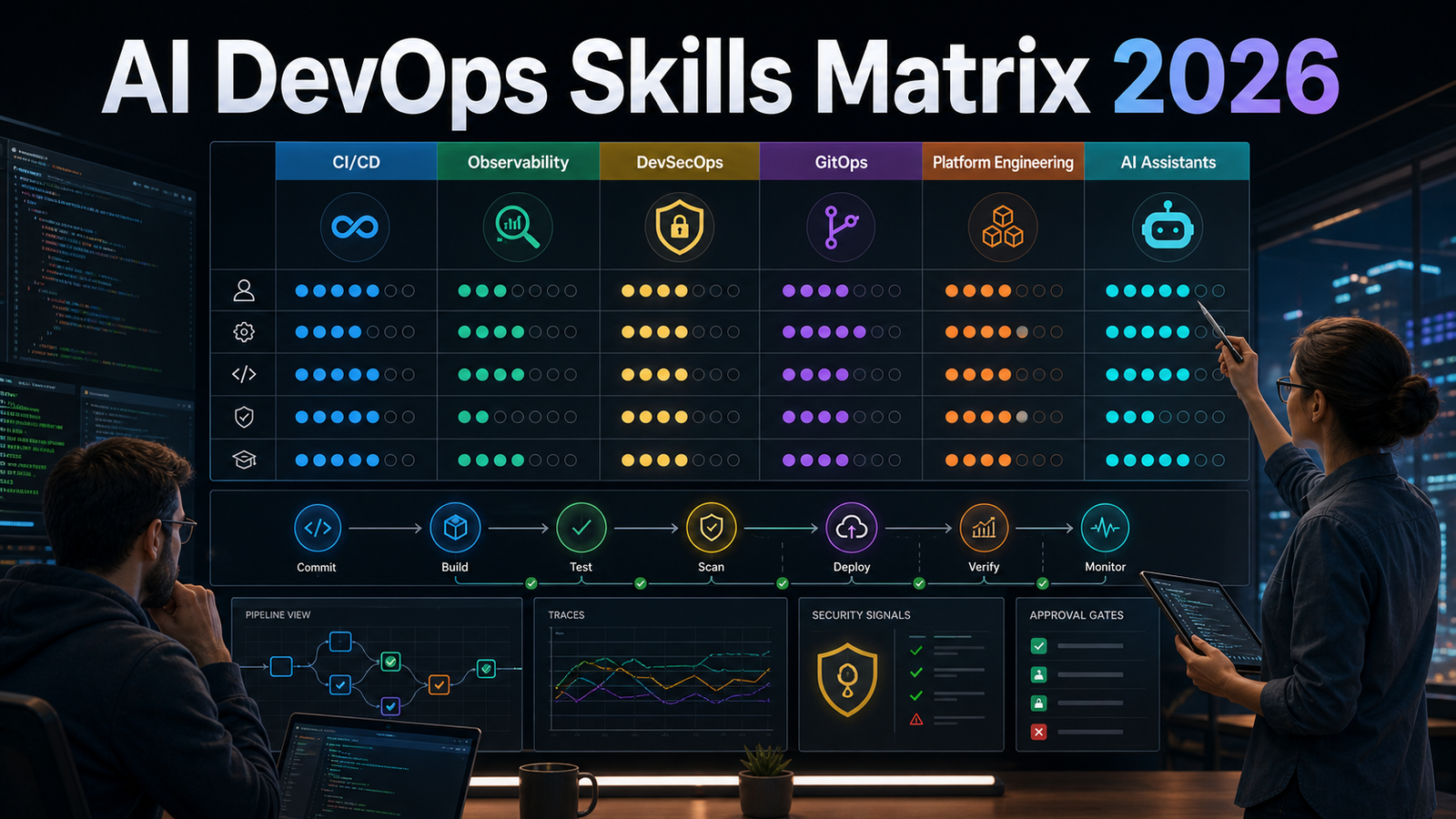

Quick Answer: The best AI DevOps skills to learn in 2026 are not “prompting” alone. Start with AI-assisted code and pipeline review, then learn log and incident summarization, OpenTelemetry-based observability, GitOps, DevSecOps guardrails, and platform engineering. Use AI where it shortens investigation and drafting, but keep humans approving production changes, access changes, infrastructure deletion, and security exceptions.
Search interest around AI and DevOps has become noisy because people are asking several questions at once. Beginners want to know whether AI will replace DevOps engineers. Practitioners want to know where AI belongs in CI/CD, Kubernetes, incident response, and platform engineering. Security teams want to know how to prevent AI-generated code, YAML, and Terraform from turning into production risk.
The answer is a skills matrix, not a single tool list. AI in DevOps is useful when it helps engineers understand, review, correlate, and document faster. It becomes dangerous when teams give it authority before they have tests, telemetry, approvals, rollback paths, and ownership.
The 2025 Stack Overflow Developer Survey reported that 84% of respondents use or plan to use AI tools in development, while trust in AI output remains low. Google Cloud’s DORA research also found that AI adoption can raise individual productivity while creating delivery tradeoffs if teams let larger batches and weaker review discipline slip into the pipeline. The practical lesson is simple: AI can speed up DevOps work, but only engineering fundamentals keep that speed reliable.
Current context: This guide uses public signals from the 2025 Stack Overflow Developer Survey, DORA research, and Gartner platform engineering guidance.
AI DevOps Skills Matrix for 2026
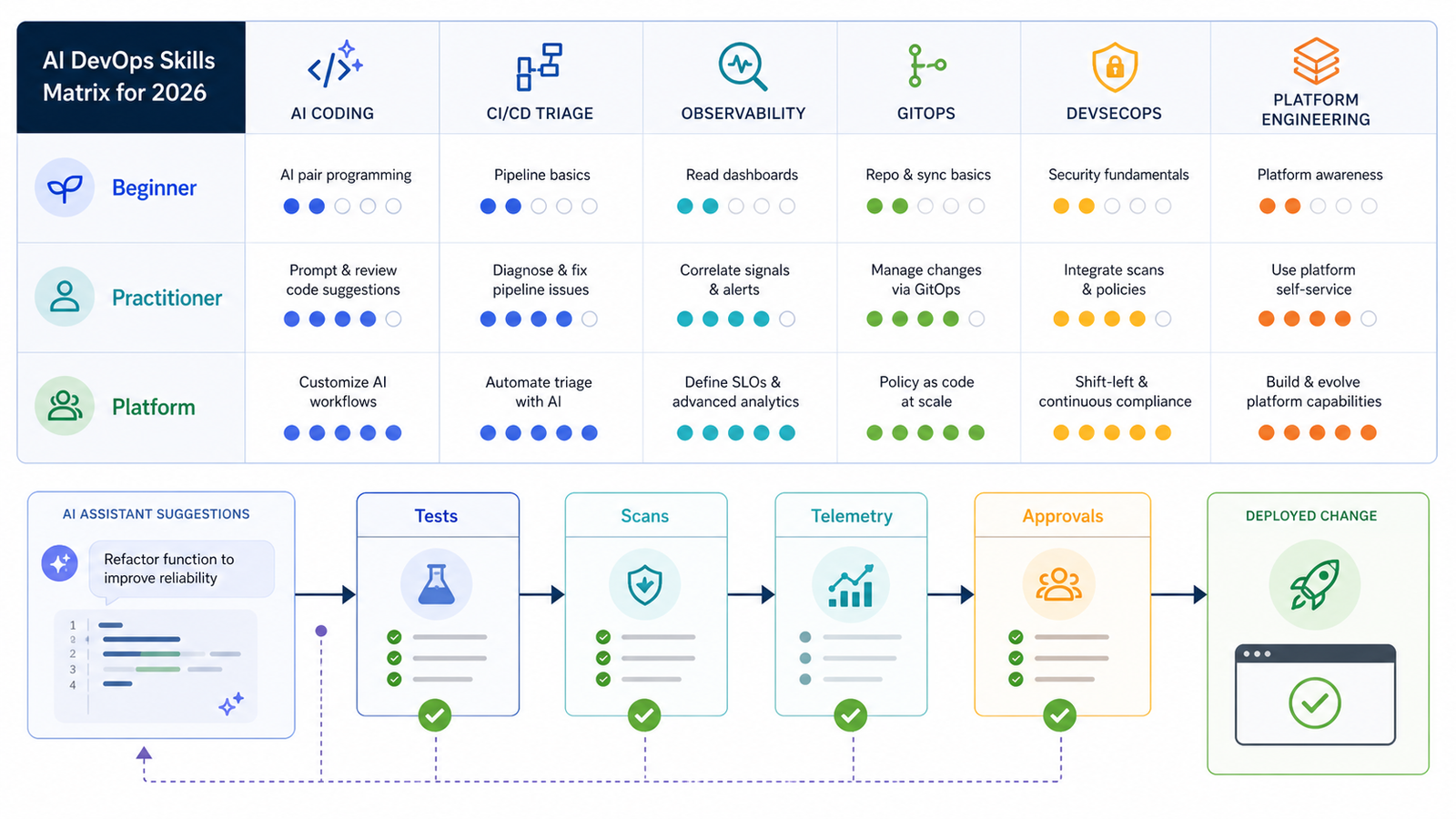
| Skill Area | What to Learn | Why It Matters | Safe First Project |
|---|---|---|---|
| AI-assisted coding | Prompting with repo context, reviewing generated code, writing tests first | Most engineers will use copilots, but unreviewed output increases defects | Ask AI to add unit tests for an existing function, then review every assertion |
| CI/CD triage | Build-log summarization, flaky test clustering, YAML review | Pipelines generate repetitive failure data that AI can summarize well | Create a workflow that summarizes failed test logs as a pull request comment |
| AIOps | Anomaly detection, alert correlation, incident timelines | On-call engineers need faster context, not blind auto-remediation | Summarize related alerts and suggest investigation steps without changing production |
| Observability | OpenTelemetry, logs, metrics, traces, service dependencies | AI cannot reason well over systems it cannot see | Instrument one API and use traces to explain a slow request path |
| GitOps | Declarative changes, pull request approvals, rollback patterns | AI-generated infrastructure changes need auditable workflows | Use Argo CD with a small app and require manual approval for promotion |
| DevSecOps | Secrets scanning, SBOMs, SAST, container scanning, policy as code | AI can generate insecure defaults and plausible but risky configs | Add secret scanning and image scanning to a demo pipeline |
| Platform engineering | Golden paths, internal developer portals, templates, guardrails | AI works better when delivery paths are standardized | Create a service template with CI, Dockerfile, monitoring, and deployment defaults |
Beginner Path: Learn AI Without Skipping DevOps Basics
If you are new to DevOps, do not begin with autonomous agents. Begin with the loop every production team still needs: code, test, build, scan, deploy, observe, rollback. AI should help you understand that loop faster, not hide it from you.
Start with generative AI fundamentals so you know how models produce answers, why they hallucinate, and why context quality matters. If that is still new, read the GravityDevOps guide on what generative AI is before wiring any AI tool into a pipeline.
Then build a small project:
- Create a simple web API in Node.js, Python, or Go.
- Add unit tests and a GitHub Actions or GitLab CI pipeline.
- Ask an AI assistant to explain one failing test log.
- Fix the issue yourself and compare your reasoning with the AI summary.
- Add container scanning, dependency scanning, and a manual deploy gate.
- Instrument the app with basic logs and OpenTelemetry traces.
This teaches the right habit: AI can explain and draft, but your pipeline verifies. If tests fail or scans catch a secret, the generated code is not acceptable.
Practitioner Path: Where AI Actually Saves Time
For working DevOps, SRE, and platform engineers, the best returns usually come from CI/CD triage, incident response, and platform enablement.
1. AI for CI/CD Triage
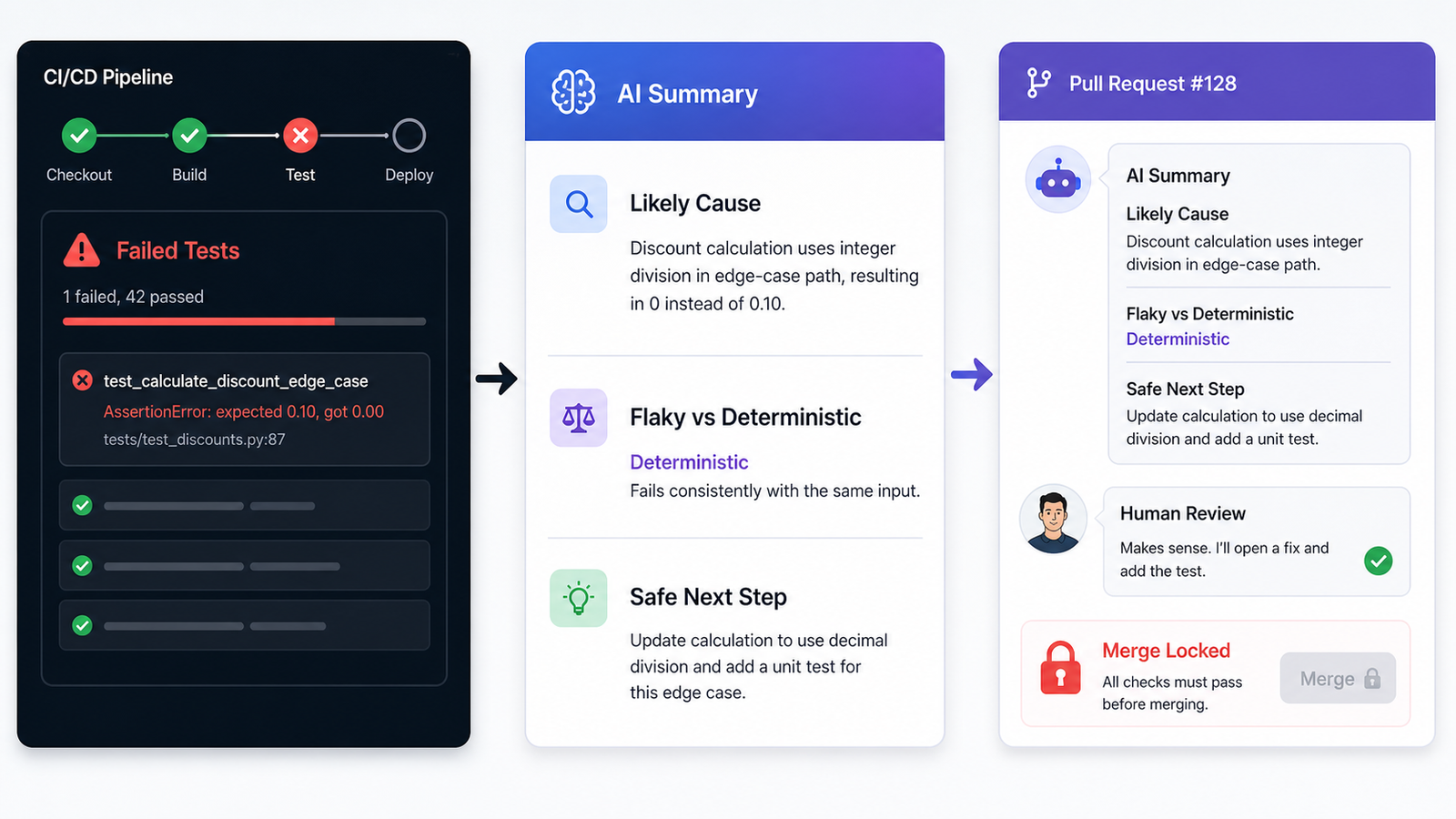
CI/CD systems produce repeated text: compiler errors, failed tests, dependency conflicts, lint failures, container build errors, and deployment logs. AI is useful here because the task is mostly interpretation. It can summarize the error, point to the likely file, group similar failures, and suggest a next command.
A safe pattern is to let AI comment on a pull request without granting merge rights. For example, your pipeline can collect failed test output and send a shortened log to a model with a prompt like:
Summarize this CI failure for the pull request author.
Return:
1. Most likely cause
2. File or command to inspect
3. Whether this looks flaky or deterministic
4. One safe next step

Do not suggest bypassing tests, disabling checks, or changing secrets.
This keeps AI advisory. The developer still reads the failure, edits the code, and lets CI verify the fix. If you are comparing pipeline platforms, use the GravityDevOps comparison of the best CI/CD tools for 2026.
2. AI for Incidents and AIOps
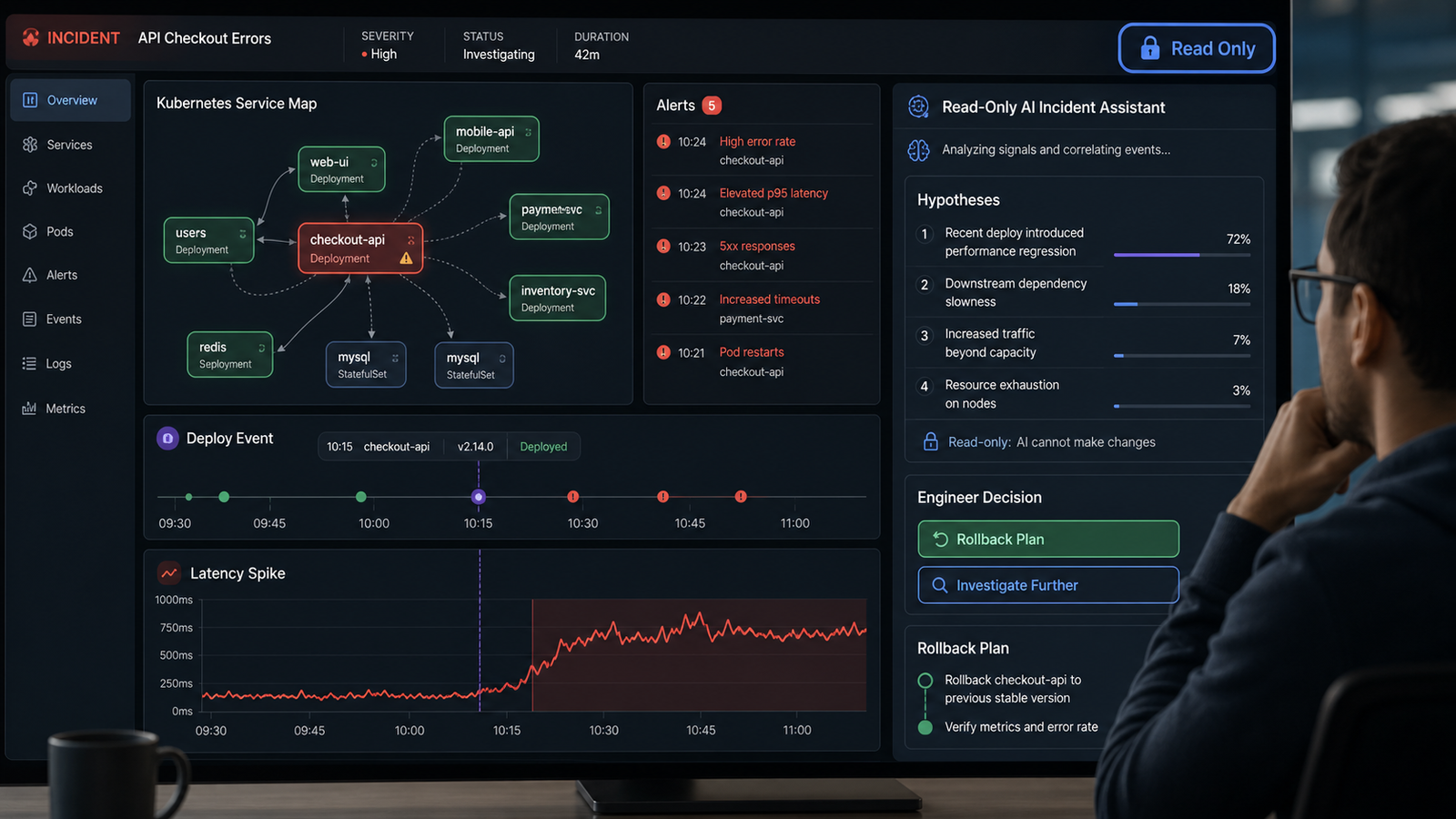
AIOps is not the same as “let an agent restart production.” Mature AIOps starts with clustering related alerts, identifying anomalies, building incident timelines, and reducing alert noise. The on-call engineer still owns mitigation.
A practical first workflow is read-only incident support:
- Collect recent alerts from the affected service.
- Pull deployment events from the last few hours.
- Summarize error-rate, latency, and saturation changes.
- Ask AI to produce a ranked list of possible causes.
- Require the engineer to choose rollback, scale-up, feature flag disablement, or deeper investigation.
This is where observability discipline becomes non-negotiable. AI needs clean logs, metrics, traces, service ownership, and deployment metadata. If your telemetry foundation is weak, prioritize the Prometheus and Grafana monitoring tutorial and OpenTelemetry basics before buying an autonomous operations tool.
3. AI for Platform Engineering
Platform engineering is the missing layer in many AI DevOps plans. Gartner has forecast that by 2026, 80% of large software engineering organizations will establish platform engineering teams that provide reusable services and tools for application delivery. AI works best when the path is constrained.
An internal developer platform can give teams a service template that already includes CI, deployment policy, observability, ownership metadata, secret management, and rollback commands. AI can fill in service-specific pieces while the template controls the guardrails.
If your organization is moving this way, connect AI adoption to golden paths and service catalogs. The GravityDevOps Platform Engineering and Backstage guide is a useful next step.
Buyer-Intent Section: Which AI DevOps Tools Should You Evaluate?
This is not a vendor ranking, but buyers still need selection criteria. The key question is not “which tool has AI?” It is “what production authority will this tool have?”
| Tool Category | Good Use Case | Pricing Caveat | Risk Level | Recommendation |
|---|---|---|---|---|
| Code copilots | Drafting code, tests, docs, pipeline snippets | Usually per-seat; enterprise controls cost more | Medium | Adopt with code review, tests, and policy rules |
| CI/CD AI assistants | Failure summaries, flaky-test analysis, PR comments | May charge by usage, seats, or pipeline minutes | Low to medium | Start here because actions are easy to verify |
| AIOps platforms | Alert correlation, anomaly detection, incident timelines | Often priced by hosts, events, data volume, or ingest | Medium | Use read-only first; add automation slowly |
| AI agents for DevOps | Multi-step investigation, runbook drafting, PR creation | Can create hidden token and tool-call costs | High | Require approvals and restrict production permissions |
| Internal platform AI | Service templates, developer portal search, runbook Q&A | Depends on platform build vs SaaS choice | Medium | Best for mature teams with standard delivery paths |
Selection Criteria for AI DevOps Tools
Use these criteria before signing a contract or enabling an agent in production:
- Permission model: Can the tool run commands, change infrastructure, rotate secrets, merge code, or deploy?
- Context boundaries: Can you control which repositories, logs, tickets, and secrets it can read?
- Audit trail: Does every AI suggestion and action create a reviewable record?
- Rollback support: Can suggested actions be reversed quickly?
- Evaluation method: Can you measure false positives, false confidence, and time saved?
- Cost visibility: Are token usage, event ingest, seats, and automation runs visible by team?
- Security posture: Does it support SSO, least privilege, data retention controls, and compliance needs?
Common Mistakes Teams Make
Mistake 1: Automating production before automating evidence. If AI cannot see deployments, metrics, traces, and ownership, it should stay advisory.
Mistake 2: Treating generated YAML as harmless. CI/CD YAML can expose secrets, weaken approvals, change targets, or skip scans. Review it like application code.
Mistake 3: Letting AI increase batch size. Delivery stability can suffer if pull requests become larger and reviews become thinner. Keep changes small.
Mistake 4: Buying AIOps without cleaning observability. No tool can reliably correlate alerts if service names, owners, environments, and deployment events are inconsistent.
Mistake 5: Skipping security guardrails. AI-generated Dockerfiles, Terraform modules, and Kubernetes manifests should pass the same policy checks as human-written changes.
Three Projects to Build This Month
Project 1: CI Failure Explainer
Build a pipeline step that captures failed test logs, truncates noisy output, and asks AI for a short explanation. Post the output as a PR comment. Do not let the tool rerun jobs, approve checks, or merge.
Project 2: Read-Only Kubernetes Incident Assistant
Use a non-production cluster. Give the assistant read-only access to pod status, events, recent logs, and deployment history. Ask it to explain why a demo service is failing. Validate every claim with kubectl.
Project 3: AI-Ready Service Template
Create a template repository with a Dockerfile, CI pipeline, dependency scanning, SBOM generation, basic metrics, logging conventions, and a README runbook. Then use AI to generate a new service from that template.
Neutral Recommendation
Learn AI DevOps now, but learn it as an engineering discipline, not as a shortcut. Beginners should focus on copilots, CI/CD, tests, and observability. Practitioners should build read-only incident support, pipeline triage, and AI-ready platform templates. Teams with mature GitOps and policy-as-code can experiment with agents, but only behind approvals and rollback paths.
If you want the broader topic map, read AI DevOps Trends 2026. If you want to decide what to automate first, read AIOps vs DevOps Automation. If your next move is GitOps, continue with the Argo CD tutorial.
FAQ
Will AI replace DevOps engineers?
No. AI is replacing some repetitive tasks, not accountability for reliability, security, cost, architecture, and production decisions. DevOps engineers who can verify AI output and design safe automation will become more valuable.
What AI DevOps skill should beginners learn first?
Start with AI-assisted test writing and CI failure explanation. These are low-risk, easy to verify, and teach you how to compare AI suggestions against real pipeline output.
Is AIOps the same as DevOps automation?
No. DevOps automation is usually deterministic: scripts, pipelines, infrastructure as code, and GitOps workflows. AIOps uses AI or machine learning to detect patterns, correlate alerts, summarize incidents, and suggest next steps.
Should AI agents be allowed to change production?
For most teams, not directly. Start with read-only agents that investigate and draft recommendations. Add write actions only for reversible, low-risk tasks with approval gates, audit logs, and rollback plans.
Which matters more for AI DevOps: prompt engineering or observability?
Observability matters more in production. Good prompts help, but AI cannot diagnose systems accurately without clean logs, metrics, traces, ownership metadata, deployment events, and service maps.
How should teams measure AI DevOps success?
Measure reduced triage time, fewer noisy alerts, faster incident summaries, review quality, change failure rate, deployment frequency, mean time to recovery, and escaped defects. Do not measure only prompts used or code generated.


